搜索到
171
篇与
的结果
-
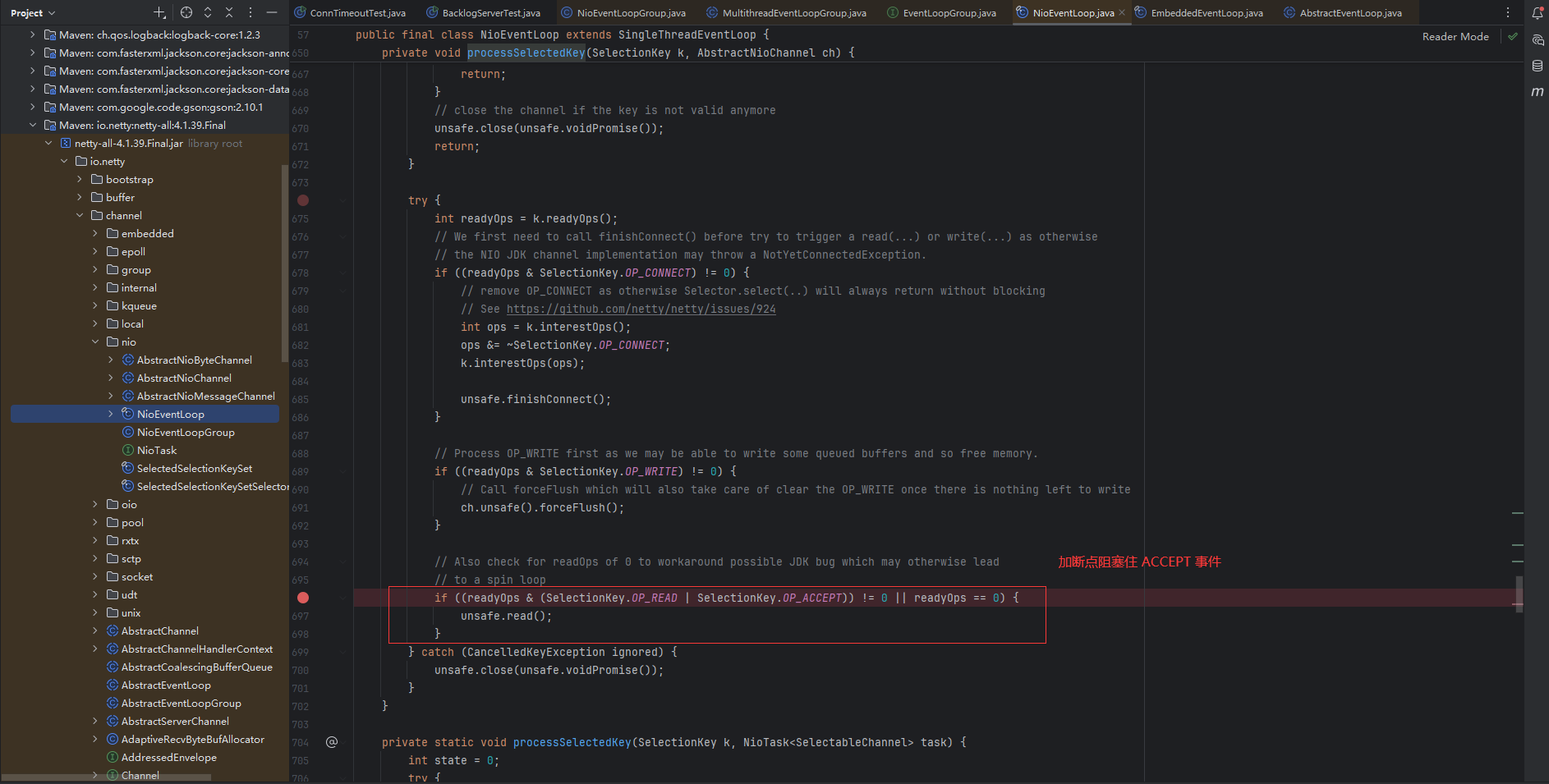
 Netty - 优化 - 参数调优 2. 参数调优2.1 CONNECT_TIMEOUT_MILLIS在客户端建立连接时,如果在指定毫秒内无法连接,则抛出 timeout 异常package com.sw.netty._07; import io.netty.bootstrap.Bootstrap; import io.netty.channel.ChannelFuture; import io.netty.channel.ChannelOption; import io.netty.channel.nio.NioEventLoopGroup; import io.netty.channel.socket.nio.NioSocketChannel; import io.netty.handler.logging.LogLevel; import io.netty.handler.logging.LoggingHandler; import lombok.extern.slf4j.Slf4j; @Slf4j public class ConnTimeoutTest { public static void main(String[] args) { NioEventLoopGroup worker = new NioEventLoopGroup(); try { Bootstrap bootstrap = new Bootstrap() .group(worker) .option(ChannelOption.CONNECT_TIMEOUT_MILLIS, 300) .channel(NioSocketChannel.class) .handler(new LoggingHandler(LogLevel.DEBUG)); ChannelFuture channelFuture = bootstrap.connect("127.0.0.1", 8088); channelFuture.sync().channel().closeFuture().sync(); } catch (Exception e) { log.error("ConnTimeoutTestClient error: ", e); } finally { worker.shutdownGracefully(); } } } 2.2 SO_BACKLOGtcp 完成三次握手后,服务端会将客户端的请求从 sync queue(半连接队列)放入 accept queue(全连接队列)在 linux 2.2 之前,backlog 参数同时包括了两个队列的大小,2.2 之后:sync queue通过 /proc/sys/net/ipv4/tcp_max_syn_backlog 指定accept queue通过 /proc/sys/net/core/somaxconn 指定,同时内核会根据用户态传入的 backlog 参数与系统参数作比较,取二者中较小的值当队列满了时,会拒绝连接客户端的请求BacklogServerTestpackage com.sw.netty._07; import io.netty.bootstrap.ServerBootstrap; import io.netty.channel.ChannelInitializer; import io.netty.channel.ChannelOption; import io.netty.channel.nio.NioEventLoopGroup; import io.netty.channel.socket.SocketChannel; import io.netty.channel.socket.nio.NioServerSocketChannel; import io.netty.handler.logging.LogLevel; import io.netty.handler.logging.LoggingHandler; public class BacklogServerTest { public static void main(String[] args) { new ServerBootstrap() .group(new NioEventLoopGroup()) // 以 windows idea 环境演示为例,指定全连接队列大小为 2 .option(ChannelOption.SO_BACKLOG, 2) .channel(NioServerSocketChannel.class) .childHandler(new ChannelInitializer<SocketChannel>() { @Override protected void initChannel(SocketChannel ch) throws Exception { ch.pipeline().addLast(new LoggingHandler(LogLevel.DEBUG)); } }).bind(8088); } } 注:netty 对客户端的连接是来一个处理一个,所以需要在 NioEventLoop 源码中通过断点阻塞住 ACCEPT 事件,即:io.netty.channel.nio.NioEventLoop#processSelectedKey 方法BacklogClientTestpackage com.sw.netty._07; import io.netty.bootstrap.Bootstrap; import io.netty.channel.ChannelFuture; import io.netty.channel.nio.NioEventLoopGroup; import io.netty.channel.socket.nio.NioSocketChannel; import io.netty.handler.logging.LogLevel; import io.netty.handler.logging.LoggingHandler; import lombok.extern.slf4j.Slf4j; @Slf4j public class BacklogClientTest { public static void main(String[] args) { NioEventLoopGroup worker = new NioEventLoopGroup(); try { Bootstrap bootstrap = new Bootstrap() .group(worker) .channel(NioSocketChannel.class) .handler(new LoggingHandler(LogLevel.DEBUG)); ChannelFuture channelFuture = bootstrap.connect("127.0.0.1", 8088); channelFuture.sync().channel().closeFuture().sync(); } catch (Exception e) { log.error("BacklogClientTest error: ", e); } finally { worker.shutdownGracefully(); } } } 建立第三个连接时,服务端全连接队列已满
 -
Netty - 优化 - 自定义序列化算法 三、优化1. 自定义序列化算法Configpackage com.sw.chat.config; import com.sw.chat.protocol.Serializer; import java.io.IOException; import java.io.InputStream; import java.util.Properties; public abstract class Config { static Properties properties; static { try (InputStream in = Config.class.getResourceAsStream("/application.properties")) { properties = new Properties(); properties.load(in); } catch (IOException e) { throw new ExceptionInInitializerError(e); } } public static int getServerPort() { String value = properties.getProperty("server.port"); if (value == null) { return 8088; } else { return Integer.parseInt(value); } } public static Serializer.Algorithm getSerializerAlgorithm() { String value = properties.getProperty("serializer.algorithm"); if (value == null) { return Serializer.Algorithm.Java; } else { return Serializer.Algorithm.valueOf(value); } } }application.propertiesserializer.algorithm=JsonMessagepackage com.sw.chat.message; import lombok.Data; import java.io.Serializable; import java.util.HashMap; import java.util.Map; @Data public abstract class Message implements Serializable { /** * 根据消息类型字节,获得对应的消息 class * * @param messageType 消息类型字节 * @return 消息 class */ public static Class<? extends Message> getMessageClass(int messageType) { return messageClasses.get(messageType); } private int sequenceId; private int messageType; public abstract int getMessageType(); public static final int LoginRequestMessage = 0; public static final int LoginResponseMessage = 1; public static final int ChatRequestMessage = 2; public static final int ChatResponseMessage = 3; public static final int GroupCreateRequestMessage = 4; public static final int GroupCreateResponseMessage = 5; public static final int GroupJoinRequestMessage = 6; public static final int GroupJoinResponseMessage = 7; public static final int GroupQuitRequestMessage = 8; public static final int GroupQuitResponseMessage = 9; public static final int GroupChatRequestMessage = 10; public static final int GroupChatResponseMessage = 11; public static final int GroupMembersRequestMessage = 12; public static final int GroupMembersResponseMessage = 13; public static final int PingMessage = 14; public static final int PongMessage = 15; /** * 请求类型 byte 值 */ public static final int RPC_MESSAGE_TYPE_REQUEST = 101; /** * 响应类型 byte 值 */ public static final int RPC_MESSAGE_TYPE_RESPONSE = 102; private static final Map<Integer, Class<? extends Message>> messageClasses = new HashMap<>(); static { messageClasses.put(LoginRequestMessage, LoginRequestMessage.class); messageClasses.put(LoginResponseMessage, LoginResponseMessage.class); messageClasses.put(ChatRequestMessage, ChatRequestMessage.class); messageClasses.put(ChatResponseMessage, ChatResponseMessage.class); messageClasses.put(GroupCreateRequestMessage, GroupCreateRequestMessage.class); messageClasses.put(GroupCreateResponseMessage, GroupCreateResponseMessage.class); messageClasses.put(GroupJoinRequestMessage, GroupJoinRequestMessage.class); messageClasses.put(GroupJoinResponseMessage, GroupJoinResponseMessage.class); messageClasses.put(GroupQuitRequestMessage, GroupQuitRequestMessage.class); messageClasses.put(GroupQuitResponseMessage, GroupQuitResponseMessage.class); messageClasses.put(GroupChatRequestMessage, GroupChatRequestMessage.class); messageClasses.put(GroupChatResponseMessage, GroupChatResponseMessage.class); messageClasses.put(GroupMembersRequestMessage, GroupMembersRequestMessage.class); messageClasses.put(GroupMembersResponseMessage, GroupMembersResponseMessage.class); messageClasses.put(RPC_MESSAGE_TYPE_REQUEST, RpcRequestMessage.class); messageClasses.put(RPC_MESSAGE_TYPE_RESPONSE, RpcResponseMessage.class); } } MessageCodecSharablepackage com.sw.chat.protocol; import com.sw.chat.config.Config; import com.sw.chat.message.Message; import io.netty.buffer.ByteBuf; import io.netty.channel.ChannelHandler; import io.netty.channel.ChannelHandlerContext; import io.netty.handler.codec.MessageToMessageCodec; import lombok.extern.slf4j.Slf4j; import java.util.List; @Slf4j @ChannelHandler.Sharable public class MessageCodecSharable extends MessageToMessageCodec<ByteBuf, Message> { @Override public void encode(ChannelHandlerContext ctx, Message msg, List<Object> outList) throws Exception { ByteBuf out = ctx.alloc().buffer(); // 1. 4 字节的魔数 out.writeBytes(new byte[]{1, 2, 3, 4}); // 2. 1 字节的版本, out.writeByte(1); // 3. 1 字节的序列化方式 jdk 0 , json 1 out.writeByte(Config.getSerializerAlgorithm().ordinal()); // 4. 1 字节的指令类型 out.writeByte(msg.getMessageType()); // 5. 4 个字节 out.writeInt(msg.getSequenceId()); // 无意义,对齐填充 out.writeByte(0xff); // 6. 获取内容的字节数组 byte[] bytes = Config.getSerializerAlgorithm().serialize(msg); // 7. 长度 out.writeInt(bytes.length); // 8. 写入内容 out.writeBytes(bytes); outList.add(out); } @Override protected void decode(ChannelHandlerContext ctx, ByteBuf in, List<Object> out) throws Exception { int magicNum = in.readInt(); byte version = in.readByte(); byte serializerAlgorithm = in.readByte(); // 0 或 1 byte messageType = in.readByte(); // 0,1,2... int sequenceId = in.readInt(); in.readByte(); int length = in.readInt(); byte[] bytes = new byte[length]; in.readBytes(bytes, 0, length); // 获取反序列化算法 Serializer.Algorithm algorithm = Serializer.Algorithm.values()[serializerAlgorithm]; // 消息类型 Class<? extends Message> messageClass = Message.getMessageClass(messageType); Message message = algorithm.deserialize(messageClass, bytes); out.add(message); } } LoginRequestMessagepackage com.sw.chat.message; import lombok.Data; import lombok.ToString; @Data @ToString(callSuper = true) public class LoginRequestMessage extends Message { private String username; private String password; public LoginRequestMessage() { } public LoginRequestMessage(String username, String password) { this.username = username; this.password = password; } @Override public int getMessageType() { return LoginRequestMessage; } } Serializerpackage com.sw.chat.protocol; import com.google.gson.*; import java.io.*; import java.lang.reflect.Type; import java.nio.charset.StandardCharsets; public interface Serializer { // 反序列化方法 <T> T deserialize(Class<T> clazz, byte[] bytes); // 序列化方法 <T> byte[] serialize(T object); enum Algorithm implements Serializer { Java { @Override public <T> T deserialize(Class<T> clazz, byte[] bytes) { try (ObjectInputStream ois = new ObjectInputStream(new ByteArrayInputStream(bytes))) { return clazz.cast(ois.readObject()); } catch (IOException | ClassNotFoundException e) { throw new RuntimeException("反序列化异常:", e); } } @Override public <T> byte[] serialize(T object) { try (ByteArrayOutputStream bos = new ByteArrayOutputStream(); ObjectOutputStream oos = new ObjectOutputStream(bos)) { oos.writeObject(object); return bos.toByteArray(); } catch (IOException e) { throw new RuntimeException("序列化异常:", e); } } }, Json { @Override public <T> T deserialize(Class<T> clazz, byte[] bytes) { Gson gson = new GsonBuilder().registerTypeAdapter(Class.class, new ClassCodec()).create(); String json = new String(bytes, StandardCharsets.UTF_8); return gson.fromJson(json, clazz); } @Override public <T> byte[] serialize(T object) { Gson gson = new GsonBuilder().registerTypeAdapter(Class.class, new ClassCodec()).create(); String json = new Gson().toJson(object); return json.getBytes(StandardCharsets.UTF_8); } } } class ClassCodec implements JsonSerializer<Class<?>>, JsonDeserializer<Class<?>> { @Override public Class<?> deserialize(JsonElement json, Type typeOfT, JsonDeserializationContext context) throws JsonParseException { try { String str = json.getAsString(); return Class.forName(str); } catch (ClassNotFoundException e) { throw new JsonParseException(e); } } @Override public JsonElement serialize(Class<?> src, Type typeOfSrc, JsonSerializationContext context) { // class -> json return new JsonPrimitive(src.getName()); } } }演示package com.sw.chat.protocol; import com.sw.chat.config.Config; import com.sw.chat.message.LoginRequestMessage; import com.sw.chat.message.Message; import io.netty.buffer.ByteBuf; import io.netty.buffer.ByteBufAllocator; import io.netty.channel.embedded.EmbeddedChannel; import io.netty.handler.logging.LoggingHandler; public class SerializerTest { public static void main(String[] args) { MessageCodecSharable MESSAGE_CODEC = new MessageCodecSharable(); LoggingHandler LOGGING_HANDLER = new LoggingHandler(); EmbeddedChannel channel = new EmbeddedChannel(LOGGING_HANDLER, MESSAGE_CODEC, LOGGING_HANDLER); LoginRequestMessage loginRequestMessage = new LoginRequestMessage("liubo", "123"); // object ---> byte // channel.writeOutbound(loginRequestMessage); // JDK Serializer // 22:58:21.511 [main] DEBUG io.netty.handler.logging.LoggingHandler - [id: 0xembedded, L:embedded - R:embedded] WRITE: 215B // +-------------------------------------------------+ // | 0 1 2 3 4 5 6 7 8 9 a b c d e f | // +--------+-------------------------------------------------+----------------+ // |00000000| 01 02 03 04 01 00 00 00 00 00 00 ff 00 00 00 c7 |................| // |00000010| ac ed 00 05 73 72 00 27 63 6f 6d 2e 73 77 2e 63 |....sr.'com.sw.c| // |00000020| 68 61 74 2e 6d 65 73 73 61 67 65 2e 4c 6f 67 69 |hat.message.Logi| // |00000030| 6e 52 65 71 75 65 73 74 4d 65 73 73 61 67 65 81 |nRequestMessage.| // |00000040| 67 c8 60 bd c6 4b b2 02 00 02 4c 00 08 70 61 73 |g.`..K....L..pas| // |00000050| 73 77 6f 72 64 74 00 12 4c 6a 61 76 61 2f 6c 61 |swordt..Ljava/la| // |00000060| 6e 67 2f 53 74 72 69 6e 67 3b 4c 00 08 75 73 65 |ng/String;L..use| // |00000070| 72 6e 61 6d 65 71 00 7e 00 01 78 72 00 1b 63 6f |rnameq.~..xr..co| // |00000080| 6d 2e 73 77 2e 63 68 61 74 2e 6d 65 73 73 61 67 |m.sw.chat.messag| // |00000090| 65 2e 4d 65 73 73 61 67 65 72 9b f3 82 41 12 0e |e.Messager...A..| // |000000a0| 4d 02 00 02 49 00 0b 6d 65 73 73 61 67 65 54 79 |M...I..messageTy| // |000000b0| 70 65 49 00 0a 73 65 71 75 65 6e 63 65 49 64 78 |peI..sequenceIdx| // |000000c0| 70 00 00 00 00 00 00 00 00 74 00 03 31 32 33 74 |p........t..123t| // |000000d0| 00 05 6c 69 75 62 6f |..liubo | // +--------+-------------------------------------------------+----------------+ // Json // 23:05:04.978 [main] DEBUG io.netty.handler.logging.LoggingHandler - [id: 0xembedded, L:embedded - R:embedded] WRITE: 84B // +-------------------------------------------------+ // | 0 1 2 3 4 5 6 7 8 9 a b c d e f | // +--------+-------------------------------------------------+----------------+ // |00000000| 01 02 03 04 01 01 00 00 00 00 00 ff 00 00 00 44 |...............D| // |00000010| 7b 22 75 73 65 72 6e 61 6d 65 22 3a 22 6c 69 75 |{"username":"liu| // |00000020| 62 6f 22 2c 22 70 61 73 73 77 6f 72 64 22 3a 22 |bo","password":"| // |00000030| 31 32 33 22 2c 22 73 65 71 75 65 6e 63 65 49 64 |123","sequenceId| // |00000040| 22 3a 30 2c 22 6d 65 73 73 61 67 65 54 79 70 65 |":0,"messageType| // |00000050| 22 3a 30 7d |":0} | // +--------+-------------------------------------------------+----------------+ // byte ---> object ByteBuf bf = msgToByteBuf(loginRequestMessage); channel.writeInbound(bf); // JDK Serializer // 23:07:25.305 [main] DEBUG io.netty.handler.logging.LoggingHandler - [id: 0xembedded, L:embedded - R:embedded] READ: 215B // +-------------------------------------------------+ // | 0 1 2 3 4 5 6 7 8 9 a b c d e f | // +--------+-------------------------------------------------+----------------+ // |00000000| 01 02 03 04 01 00 00 00 00 00 00 ff 00 00 00 c7 |................| // |00000010| ac ed 00 05 73 72 00 27 63 6f 6d 2e 73 77 2e 63 |....sr.'com.sw.c| // |00000020| 68 61 74 2e 6d 65 73 73 61 67 65 2e 4c 6f 67 69 |hat.message.Logi| // |00000030| 6e 52 65 71 75 65 73 74 4d 65 73 73 61 67 65 81 |nRequestMessage.| // |00000040| 67 c8 60 bd c6 4b b2 02 00 02 4c 00 08 70 61 73 |g.`..K....L..pas| // |00000050| 73 77 6f 72 64 74 00 12 4c 6a 61 76 61 2f 6c 61 |swordt..Ljava/la| // |00000060| 6e 67 2f 53 74 72 69 6e 67 3b 4c 00 08 75 73 65 |ng/String;L..use| // |00000070| 72 6e 61 6d 65 71 00 7e 00 01 78 72 00 1b 63 6f |rnameq.~..xr..co| // |00000080| 6d 2e 73 77 2e 63 68 61 74 2e 6d 65 73 73 61 67 |m.sw.chat.messag| // |00000090| 65 2e 4d 65 73 73 61 67 65 72 9b f3 82 41 12 0e |e.Messager...A..| // |000000a0| 4d 02 00 02 49 00 0b 6d 65 73 73 61 67 65 54 79 |M...I..messageTy| // |000000b0| 70 65 49 00 0a 73 65 71 75 65 6e 63 65 49 64 78 |peI..sequenceIdx| // |000000c0| 70 00 00 00 00 00 00 00 00 74 00 03 31 32 33 74 |p........t..123t| // |000000d0| 00 05 6c 69 75 62 6f |..liubo | // +--------+-------------------------------------------------+----------------+ // 23:07:25.309 [main] DEBUG io.netty.handler.logging.LoggingHandler - [id: 0xembedded, L:embedded - R:embedded] READ: LoginRequestMessage(super=Message(sequenceId=0, messageType=0), username=liubo, password=123) // Json // 23:08:47.272 [main] DEBUG io.netty.handler.logging.LoggingHandler - [id: 0xembedded, L:embedded - R:embedded] READ: 84B // +-------------------------------------------------+ // | 0 1 2 3 4 5 6 7 8 9 a b c d e f | // +--------+-------------------------------------------------+----------------+ // |00000000| 01 02 03 04 01 01 00 00 00 00 00 ff 00 00 00 44 |...............D| // |00000010| 7b 22 75 73 65 72 6e 61 6d 65 22 3a 22 6c 69 75 |{"username":"liu| // |00000020| 62 6f 22 2c 22 70 61 73 73 77 6f 72 64 22 3a 22 |bo","password":"| // |00000030| 31 32 33 22 2c 22 73 65 71 75 65 6e 63 65 49 64 |123","sequenceId| // |00000040| 22 3a 30 2c 22 6d 65 73 73 61 67 65 54 79 70 65 |":0,"messageType| // |00000050| 22 3a 30 7d |":0} | // +--------+-------------------------------------------------+----------------+ // 23:08:47.275 [main] DEBUG io.netty.handler.logging.LoggingHandler - [id: 0xembedded, L:embedded - R:embedded] READ: LoginRequestMessage(super=Message(sequenceId=0, messageType=0), username=liubo, password=123) } public static ByteBuf msgToByteBuf(Message msg) { int algorithm = Config.getSerializerAlgorithm().ordinal(); ByteBuf bf = ByteBufAllocator.DEFAULT.buffer(); bf.writeBytes(new byte[]{1, 2, 3, 4}); bf.writeByte(1); bf.writeByte(algorithm); bf.writeByte(msg.getMessageType()); bf.writeInt(msg.getSequenceId()); bf.writeByte(0xff); byte[] bytes = Serializer.Algorithm.values()[algorithm].serialize(msg); bf.writeInt(bytes.length); bf.writeBytes(bytes); return bf; } }
-
Netty - 协议设计与解析 5. 协议设计与解析5.1 概念TCP/IP 的消息传输基于流,没有边界,设计协议的目的就是划定消息的边界,制定通信双方需要共同遵守的通信规则5.2 redis、http 协议演示 demo(1)Redispackage com.sw.netty._06; import io.netty.bootstrap.Bootstrap; import io.netty.buffer.ByteBuf; import io.netty.channel.ChannelFuture; import io.netty.channel.ChannelHandlerContext; import io.netty.channel.ChannelInboundHandlerAdapter; import io.netty.channel.ChannelInitializer; import io.netty.channel.nio.NioEventLoopGroup; import io.netty.channel.socket.SocketChannel; import io.netty.channel.socket.nio.NioSocketChannel; import io.netty.handler.logging.LogLevel; import io.netty.handler.logging.LoggingHandler; import lombok.extern.slf4j.Slf4j; import java.nio.charset.Charset; @Slf4j public class RedisProtocolTest { public static void main(String[] args) { NioEventLoopGroup worker = new NioEventLoopGroup(); // 指定换行符 byte[] LINE = {13, 10}; try { Bootstrap bootstrap = new Bootstrap(); bootstrap.channel(NioSocketChannel.class); bootstrap.group(worker); bootstrap.handler(new ChannelInitializer<SocketChannel>() { @Override protected void initChannel(SocketChannel ch) throws Exception { ch.pipeline().addLast(new LoggingHandler(LogLevel.INFO)); ch.pipeline().addLast(new ChannelInboundHandlerAdapter() { @Override public void channelActive(ChannelHandlerContext ctx) throws Exception { ByteBuf setBf = ctx.alloc().buffer(); setBf.writeBytes("*3".getBytes()); setBf.writeBytes(LINE); setBf.writeBytes("$3".getBytes()); setBf.writeBytes(LINE); setBf.writeBytes("set".getBytes()); setBf.writeBytes(LINE); setBf.writeBytes("$4".getBytes()); setBf.writeBytes(LINE); setBf.writeBytes("test".getBytes()); setBf.writeBytes(LINE); setBf.writeBytes("$12".getBytes()); setBf.writeBytes(LINE); setBf.writeBytes("sunxiaochuan".getBytes()); setBf.writeBytes(LINE); ctx.writeAndFlush(setBf); ByteBuf getBf = ctx.alloc().buffer(); getBf.writeBytes("*2".getBytes()); getBf.writeBytes(LINE); getBf.writeBytes("$3".getBytes()); getBf.writeBytes(LINE); getBf.writeBytes("get".getBytes()); getBf.writeBytes(LINE); getBf.writeBytes("$4".getBytes()); getBf.writeBytes(LINE); getBf.writeBytes("test".getBytes()); getBf.writeBytes(LINE); ctx.writeAndFlush(getBf); } @Override public void channelRead(ChannelHandlerContext ctx, Object msg) throws Exception { ByteBuf bf = (ByteBuf) msg; log.info("read data: {}", bf.toString(Charset.defaultCharset())); } }); } }); ChannelFuture channelFuture = bootstrap.connect("192.168.123.88", 6379).sync(); channelFuture.channel().closeFuture().sync(); } catch (InterruptedException e) { log.error("RedisProtocolTest error", e); } finally { worker.shutdownGracefully(); } } // +-------------------------------------------------+ // | 0 1 2 3 4 5 6 7 8 9 a b c d e f | // +--------+-------------------------------------------------+----------------+ // |00000000| 2a 33 0d 0a 24 33 0d 0a 73 65 74 0d 0a 24 34 0d |*3..$3..set..$4.| // |00000010| 0a 74 65 73 74 0d 0a 24 31 32 0d 0a 73 75 6e 78 |.test..$12..sunx| // |00000020| 69 61 6f 63 68 75 61 6e 0d 0a |iaochuan.. | // +--------+-------------------------------------------------+----------------+ // 23:30:05.579 [nioEventLoopGroup-2-1] INFO io.netty.handler.logging.LoggingHandler - [id: 0xe34a1d05, L:/192.168.123.150:54851 - R:/192.168.123.88:6379] FLUSH // 23:30:05.579 [nioEventLoopGroup-2-1] INFO io.netty.handler.logging.LoggingHandler - [id: 0xe34a1d05, L:/192.168.123.150:54851 - R:/192.168.123.88:6379] WRITE: 23B // +-------------------------------------------------+ // | 0 1 2 3 4 5 6 7 8 9 a b c d e f | // +--------+-------------------------------------------------+----------------+ // |00000000| 2a 32 0d 0a 24 33 0d 0a 67 65 74 0d 0a 24 34 0d |*2..$3..get..$4.| // |00000010| 0a 74 65 73 74 0d 0a |.test.. | // +--------+-------------------------------------------------+----------------+ // 23:30:05.579 [nioEventLoopGroup-2-1] INFO io.netty.handler.logging.LoggingHandler - [id: 0xe34a1d05, L:/192.168.123.150:54851 - R:/192.168.123.88:6379] FLUSH // 23:30:05.581 [nioEventLoopGroup-2-1] INFO io.netty.handler.logging.LoggingHandler - [id: 0xe34a1d05, L:/192.168.123.150:54851 - R:/192.168.123.88:6379] READ: 24B // +-------------------------------------------------+ // | 0 1 2 3 4 5 6 7 8 9 a b c d e f | // +--------+-------------------------------------------------+----------------+ // |00000000| 2b 4f 4b 0d 0a 24 31 32 0d 0a 73 75 6e 78 69 61 |+OK..$12..sunxia| // |00000010| 6f 63 68 75 61 6e 0d 0a |ochuan.. | // +--------+-------------------------------------------------+----------------+ // 23:30:05.581 [nioEventLoopGroup-2-1] INFO com.sw.netty._06.RedisProtocolTest - read data: +OK // $12 // sunxiaochuan } (2)httppackage com.sw.netty._06; import io.netty.bootstrap.Bootstrap; import io.netty.bootstrap.ServerBootstrap; import io.netty.buffer.ByteBuf; import io.netty.channel.*; import io.netty.channel.nio.NioEventLoopGroup; import io.netty.channel.socket.SocketChannel; import io.netty.channel.socket.nio.NioServerSocketChannel; import io.netty.channel.socket.nio.NioSocketChannel; import io.netty.handler.codec.http.DefaultFullHttpResponse; import io.netty.handler.codec.http.HttpRequest; import io.netty.handler.codec.http.HttpResponseStatus; import io.netty.handler.codec.http.HttpServerCodec; import io.netty.handler.logging.LogLevel; import io.netty.handler.logging.LoggingHandler; import lombok.extern.slf4j.Slf4j; import java.nio.charset.Charset; import static io.netty.handler.codec.http.HttpHeaderNames.CONTENT_LENGTH; @Slf4j public class HttpProtocolTest { public static void main(String[] args) { NioEventLoopGroup main = new NioEventLoopGroup(); NioEventLoopGroup worker = new NioEventLoopGroup(); try { ServerBootstrap serverBootstrap = new ServerBootstrap(); serverBootstrap.channel(NioServerSocketChannel.class); serverBootstrap.group(main, worker); serverBootstrap.childHandler(new ChannelInitializer<SocketChannel>() { @Override protected void initChannel(SocketChannel ch) throws Exception { ch.pipeline().addLast(new LoggingHandler(LogLevel.INFO)); ch.pipeline().addLast(new HttpServerCodec()); ch.pipeline().addLast(new SimpleChannelInboundHandler<HttpRequest>() { @Override protected void channelRead0(ChannelHandlerContext ctx, HttpRequest msg) throws Exception { log.info("request uri[{}]", msg.uri()); DefaultFullHttpResponse resp = new DefaultFullHttpResponse(msg.protocolVersion(), HttpResponseStatus.OK); byte[] bytes = "sunxiaochuan".getBytes(); resp.headers().setInt(CONTENT_LENGTH, bytes.length); resp.content().writeBytes(bytes); ctx.writeAndFlush(resp); } }); } }); ChannelFuture channelFuture = serverBootstrap.bind(8088).sync(); channelFuture.channel().closeFuture().sync(); } catch (InterruptedException e) { log.error("HttpProtocolTest error", e); } finally { main.shutdownGracefully(); worker.shutdownGracefully(); } } // +-------------------------------------------------+ // | 0 1 2 3 4 5 6 7 8 9 a b c d e f | // +--------+-------------------------------------------------+----------------+ // |00000000| 47 45 54 20 2f 20 48 54 54 50 2f 31 2e 31 0d 0a |GET / HTTP/1.1..| // |00000010| 48 6f 73 74 3a 20 6c 6f 63 61 6c 68 6f 73 74 3a |Host: localhost:| // |00000020| 38 30 38 38 0d 0a 43 6f 6e 6e 65 63 74 69 6f 6e |8088..Connection| // |00000030| 3a 20 6b 65 65 70 2d 61 6c 69 76 65 0d 0a 73 65 |: keep-alive..se| // |00000040| 63 2d 63 68 2d 75 61 3a 20 22 4e 6f 74 3b 41 3d |c-ch-ua: "Not;A=| // |00000050| 42 72 61 6e 64 22 3b 76 3d 22 38 22 2c 20 22 43 |Brand";v="8", "C| // |00000060| 68 72 6f 6d 69 75 6d 22 3b 76 3d 22 31 35 30 22 |hromium";v="150"| // |00000070| 2c 20 22 47 6f 6f 67 6c 65 20 43 68 72 6f 6d 65 |, "Google Chrome| // |00000080| 22 3b 76 3d 22 31 35 30 22 0d 0a 73 65 63 2d 63 |";v="150"..sec-c| // |00000090| 68 2d 75 61 2d 6d 6f 62 69 6c 65 3a 20 3f 30 0d |h-ua-mobile: ?0.| // |000000a0| 0a 73 65 63 2d 63 68 2d 75 61 2d 70 6c 61 74 66 |.sec-ch-ua-platf| // |000000b0| 6f 72 6d 3a 20 22 57 69 6e 64 6f 77 73 22 0d 0a |orm: "Windows"..| // |000000c0| 55 70 67 72 61 64 65 2d 49 6e 73 65 63 75 72 65 |Upgrade-Insecure| // |000000d0| 2d 52 65 71 75 65 73 74 73 3a 20 31 0d 0a 55 73 |-Requests: 1..Us| // |000000e0| 65 72 2d 41 67 65 6e 74 3a 20 4d 6f 7a 69 6c 6c |er-Agent: Mozill| // |000000f0| 61 2f 35 2e 30 20 28 57 69 6e 64 6f 77 73 20 4e |a/5.0 (Windows N| // |00000100| 54 20 31 30 2e 30 3b 20 57 69 6e 36 34 3b 20 78 |T 10.0; Win64; x| // |00000110| 36 34 29 20 41 70 70 6c 65 57 65 62 4b 69 74 2f |64) AppleWebKit/| // |00000120| 35 33 37 2e 33 36 20 28 4b 48 54 4d 4c 2c 20 6c |537.36 (KHTML, l| // |00000130| 69 6b 65 20 47 65 63 6b 6f 29 20 43 68 72 6f 6d |ike Gecko) Chrom| // |00000140| 65 2f 31 35 30 2e 30 2e 30 2e 30 20 53 61 66 61 |e/150.0.0.0 Safa| // |00000150| 72 69 2f 35 33 37 2e 33 36 0d 0a 41 63 63 65 70 |ri/537.36..Accep| // |00000160| 74 3a 20 74 65 78 74 2f 68 74 6d 6c 2c 61 70 70 |t: text/html,app| // |00000170| 6c 69 63 61 74 69 6f 6e 2f 78 68 74 6d 6c 2b 78 |lication/xhtml+x| // |00000180| 6d 6c 2c 61 70 70 6c 69 63 61 74 69 6f 6e 2f 78 |ml,application/x| // |00000190| 6d 6c 3b 71 3d 30 2e 39 2c 69 6d 61 67 65 2f 61 |ml;q=0.9,image/a| // |000001a0| 76 69 66 2c 69 6d 61 67 65 2f 77 65 62 70 2c 69 |vif,image/webp,i| // |000001b0| 6d 61 67 65 2f 61 70 6e 67 2c 2a 2f 2a 3b 71 3d |mage/apng,*/*;q=| // |000001c0| 30 2e 38 2c 61 70 70 6c 69 63 61 74 69 6f 6e 2f |0.8,application/| // |000001d0| 73 69 67 6e 65 64 2d 65 78 63 68 61 6e 67 65 3b |signed-exchange;| // |000001e0| 76 3d 62 33 3b 71 3d 30 2e 37 0d 0a 53 65 63 2d |v=b3;q=0.7..Sec-| // |000001f0| 46 65 74 63 68 2d 53 69 74 65 3a 20 6e 6f 6e 65 |Fetch-Site: none| // |00000200| 0d 0a 53 65 63 2d 46 65 74 63 68 2d 4d 6f 64 65 |..Sec-Fetch-Mode| // |00000210| 3a 20 6e 61 76 69 67 61 74 65 0d 0a 53 65 63 2d |: navigate..Sec-| // |00000220| 46 65 74 63 68 2d 55 73 65 72 3a 20 3f 31 0d 0a |Fetch-User: ?1..| // |00000230| 53 65 63 2d 46 65 74 63 68 2d 44 65 73 74 3a 20 |Sec-Fetch-Dest: | // |00000240| 64 6f 63 75 6d 65 6e 74 0d 0a 41 63 63 65 70 74 |document..Accept| // |00000250| 2d 45 6e 63 6f 64 69 6e 67 3a 20 67 7a 69 70 2c |-Encoding: gzip,| // |00000260| 20 64 65 66 6c 61 74 65 2c 20 62 72 2c 20 7a 73 | deflate, br, zs| // |00000270| 74 64 0d 0a 41 63 63 65 70 74 2d 4c 61 6e 67 75 |td..Accept-Langu| // |00000280| 61 67 65 3a 20 7a 68 2d 43 4e 2c 7a 68 3b 71 3d |age: zh-CN,zh;q=| // |00000290| 30 2e 39 2c 7a 68 2d 54 57 3b 71 3d 30 2e 38 0d |0.9,zh-TW;q=0.8.| // |000002a0| 0a 0d 0a |... | // +--------+-------------------------------------------------+----------------+ // 23:41:47.151 [nioEventLoopGroup-3-1] INFO com.sw.netty._06.HttpProtocolTest - request uri[/] // 23:41:47.154 [nioEventLoopGroup-3-1] INFO io.netty.handler.logging.LoggingHandler - [id: 0xdcfdcd8c, L:/0:0:0:0:0:0:0:1:8088 - R:/0:0:0:0:0:0:0:1:55246] WRITE: 51B // +-------------------------------------------------+ // | 0 1 2 3 4 5 6 7 8 9 a b c d e f | // +--------+-------------------------------------------------+----------------+ // |00000000| 48 54 54 50 2f 31 2e 31 20 32 30 30 20 4f 4b 0d |HTTP/1.1 200 OK.| // |00000010| 0a 63 6f 6e 74 65 6e 74 2d 6c 65 6e 67 74 68 3a |.content-length:| // |00000020| 20 31 32 0d 0a 0d 0a 73 75 6e 78 69 61 6f 63 68 | 12....sunxiaoch| // |00000030| 75 61 6e |uan | // +--------+-------------------------------------------------+----------------+ }
-
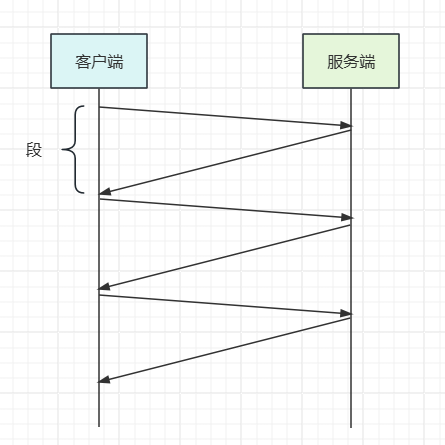
Netty - 粘包、半包 4. 粘包、半包4.1 粘包FullPackServerpackage com.sw.netty._05; import io.netty.bootstrap.ServerBootstrap; import io.netty.channel.ChannelFuture; import io.netty.channel.ChannelHandlerContext; import io.netty.channel.ChannelInboundHandlerAdapter; import io.netty.channel.ChannelInitializer; import io.netty.channel.nio.NioEventLoopGroup; import io.netty.channel.socket.SocketChannel; import io.netty.channel.socket.nio.NioServerSocketChannel; import io.netty.handler.logging.LogLevel; import io.netty.handler.logging.LoggingHandler; import lombok.extern.slf4j.Slf4j; @Slf4j public class FullPackServer { public static void main(String[] args) { new FullPackServer().start(); // 23:08:22.078 [nioEventLoopGroup-3-1] INFO io.netty.handler.logging.LoggingHandler - [id: 0x2615b37f, L:/127.0.0.1:8088 - R:/127.0.0.1:62128] READ: 360B // +-------------------------------------------------+ // | 0 1 2 3 4 5 6 7 8 9 a b c d e f | // +--------+-------------------------------------------------+----------------+ // |00000000| 64 35 33 64 34 38 37 33 2d 38 65 31 64 2d 34 62 |d53d4873-8e1d-4b| // |00000010| 31 31 2d 39 65 65 31 2d 31 33 34 36 30 35 62 38 |11-9ee1-134605b8| // |00000020| 37 34 32 63 34 35 38 64 30 66 63 62 2d 34 31 61 |742c458d0fcb-41a| // |00000030| 34 2d 34 62 61 33 2d 62 33 30 61 2d 66 38 66 65 |4-4ba3-b30a-f8fe| // |00000040| 65 36 31 65 64 65 34 61 31 38 33 39 37 61 34 37 |e61ede4a18397a47| // |00000050| 2d 61 35 36 34 2d 34 62 37 38 2d 61 62 37 39 2d |-a564-4b78-ab79-| // |00000060| 66 35 39 32 36 61 32 64 62 65 38 33 62 38 31 31 |f5926a2dbe83b811| // |00000070| 31 37 37 66 2d 66 36 63 62 2d 34 66 36 63 2d 38 |177f-f6cb-4f6c-8| // |00000080| 31 32 63 2d 38 61 38 64 61 62 34 32 62 66 32 38 |12c-8a8dab42bf28| // |00000090| 39 62 63 35 64 33 32 31 2d 35 36 64 63 2d 34 33 |9bc5d321-56dc-43| // |000000a0| 31 34 2d 62 30 61 39 2d 34 62 65 64 65 39 66 63 |14-b0a9-4bede9fc| // |000000b0| 35 33 35 66 66 38 61 32 33 65 37 63 2d 35 36 30 |535ff8a23e7c-560| // |000000c0| 33 2d 34 62 66 30 2d 62 34 66 33 2d 35 30 37 32 |3-4bf0-b4f3-5072| // |000000d0| 30 33 35 37 66 37 64 62 63 39 31 39 66 32 32 39 |0357f7dbc919f229| // |000000e0| 2d 30 32 63 34 2d 34 65 35 31 2d 62 63 30 36 2d |-02c4-4e51-bc06-| // |000000f0| 63 33 65 63 33 66 34 35 65 61 34 30 62 32 38 35 |c3ec3f45ea40b285| // |00000100| 38 65 30 36 2d 33 64 36 30 2d 34 35 64 32 2d 61 |8e06-3d60-45d2-a| // |00000110| 64 65 63 2d 35 36 35 62 35 61 35 31 30 61 37 35 |dec-565b5a510a75| // |00000120| 62 62 64 65 35 65 63 31 2d 63 62 62 62 2d 34 62 |bbde5ec1-cbbb-4b| // |00000130| 31 61 2d 61 39 36 35 2d 63 38 32 65 37 61 30 34 |1a-a965-c82e7a04| // |00000140| 34 32 33 32 35 39 32 65 61 33 38 34 2d 33 32 34 |4232592ea384-324| // |00000150| 30 2d 34 31 63 63 2d 39 66 35 65 2d 35 65 33 63 |0-41cc-9f5e-5e3c| // |00000160| 33 66 62 66 37 31 34 33 |3fbf7143 | // +--------+-------------------------------------------------+----------------+ } private void start() { NioEventLoopGroup main = new NioEventLoopGroup(1); NioEventLoopGroup worker = new NioEventLoopGroup(); try { ServerBootstrap serverBootstrap = new ServerBootstrap(); serverBootstrap.channel(NioServerSocketChannel.class); serverBootstrap.group(main, worker); serverBootstrap.childHandler(new ChannelInitializer<SocketChannel>() { @Override protected void initChannel(SocketChannel ch) throws Exception { ch.pipeline().addLast(new LoggingHandler(LogLevel.INFO)); ch.pipeline().addLast(new ChannelInboundHandlerAdapter() { @Override public void channelActive(ChannelHandlerContext ctx) throws Exception { log.info("connected {}", ctx.channel()); super.channelActive(ctx); } @Override public void channelInactive(ChannelHandlerContext ctx) throws Exception { log.info("disconnected {}", ctx.channel()); super.channelInactive(ctx); } }); } }); ChannelFuture channelFuture = serverBootstrap.bind(8088); log.info("{} binding...", channelFuture.channel()); channelFuture.sync(); log.info("{} bound...", channelFuture.channel()); channelFuture.channel().closeFuture().sync(); } catch (Exception e) { log.error("server error {}", e.getMessage()); } finally { main.shutdownGracefully(); worker.shutdownGracefully(); log.info("server stoped"); } } } FullPackClientpackage com.sw.netty._05; import io.netty.bootstrap.Bootstrap; import io.netty.buffer.ByteBuf; import io.netty.channel.ChannelFuture; import io.netty.channel.ChannelHandlerContext; import io.netty.channel.ChannelInboundHandlerAdapter; import io.netty.channel.ChannelInitializer; import io.netty.channel.nio.NioEventLoopGroup; import io.netty.channel.socket.SocketChannel; import io.netty.channel.socket.nio.NioSocketChannel; import lombok.extern.slf4j.Slf4j; import java.util.UUID; @Slf4j public class FullPackClient { public static void main(String[] args) { NioEventLoopGroup worker = new NioEventLoopGroup(); try { Bootstrap bootstrap = new Bootstrap(); bootstrap.channel(NioSocketChannel.class); bootstrap.group(worker); bootstrap.handler(new ChannelInitializer<SocketChannel>() { @Override protected void initChannel(SocketChannel ch) throws Exception { log.info("connected..."); ch.pipeline().addLast(new ChannelInboundHandlerAdapter() { @Override public void channelActive(ChannelHandlerContext ctx) throws Exception { log.info("sending data..."); for (int i = 0; i < 10; i++) { String data = UUID.randomUUID().toString(); ByteBuf bf = ctx.alloc().buffer(); bf.writeBytes(data.getBytes()); ctx.writeAndFlush(bf); } } }); } }); ChannelFuture channelFuture = bootstrap.connect("localhost", 8088); channelFuture.channel().closeFuture().sync(); } catch (Exception e) { log.error("client error {}", e.getMessage()); } finally { worker.shutdownGracefully(); } } } 如上 demo 所示,服务端期望分10次接收客户端发过来的数据,但实际情况是一次就收到了 360B 的数据(粘包现象)4.2 半包HalfPackServerpackage com.sw.netty._05; import io.netty.bootstrap.ServerBootstrap; import io.netty.channel.*; import io.netty.channel.nio.NioEventLoopGroup; import io.netty.channel.socket.SocketChannel; import io.netty.channel.socket.nio.NioServerSocketChannel; import io.netty.handler.logging.LogLevel; import io.netty.handler.logging.LoggingHandler; import lombok.extern.slf4j.Slf4j; @Slf4j public class HalfPackServer { public static void main(String[] args) { new HalfPackServer().start(); } private void start() { NioEventLoopGroup main = new NioEventLoopGroup(1); NioEventLoopGroup worker = new NioEventLoopGroup(); try { ServerBootstrap serverBootstrap = new ServerBootstrap(); serverBootstrap.channel(NioServerSocketChannel.class); serverBootstrap.group(main, worker); // 服务端指定接收缓冲区大小为 16 字节 serverBootstrap.option(ChannelOption.SO_RCVBUF, 16); serverBootstrap.childHandler(new ChannelInitializer<SocketChannel>() { @Override protected void initChannel(SocketChannel ch) throws Exception { ch.pipeline().addLast(new LoggingHandler(LogLevel.INFO)); ch.pipeline().addLast(new ChannelInboundHandlerAdapter() { @Override public void channelActive(ChannelHandlerContext ctx) throws Exception { log.info("connected {}", ctx.channel()); super.channelActive(ctx); } @Override public void channelInactive(ChannelHandlerContext ctx) throws Exception { log.info("disconnected {}", ctx.channel()); super.channelInactive(ctx); } }); } }); ChannelFuture channelFuture = serverBootstrap.bind(8088); log.info("{} binding...", channelFuture.channel()); channelFuture.sync(); log.info("{} bound...", channelFuture.channel()); channelFuture.channel().closeFuture().sync(); } catch (Exception e) { log.error("server error {}", e.getMessage()); } finally { main.shutdownGracefully(); worker.shutdownGracefully(); log.info("server stoped"); } } } HalfPackClientpackage com.sw.netty._05; import io.netty.bootstrap.Bootstrap; import io.netty.buffer.ByteBuf; import io.netty.channel.ChannelFuture; import io.netty.channel.ChannelHandlerContext; import io.netty.channel.ChannelInboundHandlerAdapter; import io.netty.channel.ChannelInitializer; import io.netty.channel.nio.NioEventLoopGroup; import io.netty.channel.socket.SocketChannel; import io.netty.channel.socket.nio.NioSocketChannel; import lombok.extern.slf4j.Slf4j; import java.util.UUID; @Slf4j public class HalfPackClient { public static void main(String[] args) { NioEventLoopGroup worker = new NioEventLoopGroup(); try { Bootstrap bootstrap = new Bootstrap(); bootstrap.channel(NioSocketChannel.class); bootstrap.group(worker); bootstrap.handler(new ChannelInitializer<SocketChannel>() { @Override protected void initChannel(SocketChannel ch) throws Exception { log.info("connected..."); ch.pipeline().addLast(new ChannelInboundHandlerAdapter() { @Override public void channelActive(ChannelHandlerContext ctx) throws Exception { log.info("sending data..."); for (int i = 0; i < 10; i++) { String data = UUID.randomUUID().toString(); ByteBuf bf = ctx.alloc().buffer(); bf.writeBytes(data.getBytes()); ctx.writeAndFlush(bf); } } }); } }); ChannelFuture channelFuture = bootstrap.connect("localhost", 8088); channelFuture.channel().closeFuture().sync(); } catch (Exception e) { log.error("client error {}", e.getMessage()); } finally { worker.shutdownGracefully(); } } } Server Log23:17:26.613 [nioEventLoopGroup-3-1] INFO io.netty.handler.logging.LoggingHandler - [id: 0x2b332ddd, L:/127.0.0.1:8088 - R:/127.0.0.1:62753] READ: 80B +-------------------------------------------------+ | 0 1 2 3 4 5 6 7 8 9 a b c d e f | +--------+-------------------------------------------------+----------------+ |00000000| 35 38 37 65 66 34 33 33 2d 30 34 35 34 2d 34 62 |587ef433-0454-4b| |00000010| 66 61 2d 61 63 62 61 2d 34 32 63 32 66 61 32 30 |fa-acba-42c2fa20| |00000020| 62 31 36 32 62 32 31 39 61 32 35 31 2d 33 35 63 |b162b219a251-35c| |00000030| 65 2d 34 61 37 63 2d 62 66 65 34 2d 30 39 63 39 |e-4a7c-bfe4-09c9| |00000040| 31 35 33 63 34 36 62 38 66 31 30 32 36 34 35 33 |153c46b8f1026453| +--------+-------------------------------------------------+----------------+ 23:17:26.613 [nioEventLoopGroup-3-1] DEBUG io.netty.channel.DefaultChannelPipeline - Discarded inbound message PooledUnsafeDirectByteBuf(ridx: 0, widx: 80, cap: 1024) that reached at the tail of the pipeline. Please check your pipeline configuration. 23:17:26.613 [nioEventLoopGroup-3-1] DEBUG io.netty.channel.DefaultChannelPipeline - Discarded message pipeline : [LoggingHandler#0, HalfPackServer$1$1#0, DefaultChannelPipeline$TailContext#0]. Channel : [id: 0x2b332ddd, L:/127.0.0.1:8088 - R:/127.0.0.1:62753]. 23:17:26.613 [nioEventLoopGroup-3-1] INFO io.netty.handler.logging.LoggingHandler - [id: 0x2b332ddd, L:/127.0.0.1:8088 - R:/127.0.0.1:62753] READ COMPLETE 23:17:26.613 [nioEventLoopGroup-3-1] INFO io.netty.handler.logging.LoggingHandler - [id: 0x2b332ddd, L:/127.0.0.1:8088 - R:/127.0.0.1:62753] READ: 64B +-------------------------------------------------+ | 0 1 2 3 4 5 6 7 8 9 a b c d e f | +--------+-------------------------------------------------+----------------+ |00000000| 2d 35 63 63 31 2d 34 39 65 34 2d 61 61 32 38 2d |-5cc1-49e4-aa28-| |00000010| 65 33 36 61 65 64 38 37 64 66 35 36 65 35 35 62 |e36aed87df56e55b| |00000020| 37 61 31 62 2d 64 35 33 38 2d 34 37 66 62 2d 62 |7a1b-d538-47fb-b| |00000030| 36 61 64 2d 33 65 66 34 66 34 34 64 62 62 36 66 |6ad-3ef4f44dbb6f| +--------+-------------------------------------------------+----------------+ 23:17:26.613 [nioEventLoopGroup-3-1] DEBUG io.netty.channel.DefaultChannelPipeline - Discarded inbound message PooledUnsafeDirectByteBuf(ridx: 0, widx: 64, cap: 1024) that reached at the tail of the pipeline. Please check your pipeline configuration. 23:17:26.613 [nioEventLoopGroup-3-1] DEBUG io.netty.channel.DefaultChannelPipeline - Discarded message pipeline : [LoggingHandler#0, HalfPackServer$1$1#0, DefaultChannelPipeline$TailContext#0]. Channel : [id: 0x2b332ddd, L:/127.0.0.1:8088 - R:/127.0.0.1:62753]. 23:17:26.613 [nioEventLoopGroup-3-1] INFO io.netty.handler.logging.LoggingHandler - [id: 0x2b332ddd, L:/127.0.0.1:8088 - R:/127.0.0.1:62753] READ COMPLETE 23:17:26.614 [nioEventLoopGroup-3-1] INFO io.netty.handler.logging.LoggingHandler - [id: 0x2b332ddd, L:/127.0.0.1:8088 - R:/127.0.0.1:62753] READ: 80B +-------------------------------------------------+ | 0 1 2 3 4 5 6 7 8 9 a b c d e f | +--------+-------------------------------------------------+----------------+ |00000000| 65 30 39 64 66 35 64 62 2d 66 31 37 31 2d 34 39 |e09df5db-f171-49| |00000010| 66 36 2d 61 64 64 35 2d 64 33 64 33 39 31 33 66 |f6-add5-d3d3913f| |00000020| 37 39 35 30 65 37 62 39 35 35 34 62 2d 64 39 63 |7950e7b9554b-d9c| |00000030| 63 2d 34 33 63 63 2d 62 36 38 38 2d 31 35 65 66 |c-43cc-b688-15ef| |00000040| 62 62 61 66 34 37 63 39 61 64 32 65 35 38 35 35 |bbaf47c9ad2e5855| +--------+-------------------------------------------------+----------------+ 23:17:26.614 [nioEventLoopGroup-3-1] DEBUG io.netty.channel.DefaultChannelPipeline - Discarded inbound message PooledUnsafeDirectByteBuf(ridx: 0, widx: 80, cap: 512) that reached at the tail of the pipeline. Please check your pipeline configuration. 23:17:26.614 [nioEventLoopGroup-3-1] DEBUG io.netty.channel.DefaultChannelPipeline - Discarded message pipeline : [LoggingHandler#0, HalfPackServer$1$1#0, DefaultChannelPipeline$TailContext#0]. Channel : [id: 0x2b332ddd, L:/127.0.0.1:8088 - R:/127.0.0.1:62753]. 23:17:26.614 [nioEventLoopGroup-3-1] INFO io.netty.handler.logging.LoggingHandler - [id: 0x2b332ddd, L:/127.0.0.1:8088 - R:/127.0.0.1:62753] READ COMPLETE 23:17:26.614 [nioEventLoopGroup-3-1] INFO io.netty.handler.logging.LoggingHandler - [id: 0x2b332ddd, L:/127.0.0.1:8088 - R:/127.0.0.1:62753] READ: 64B +-------------------------------------------------+ | 0 1 2 3 4 5 6 7 8 9 a b c d e f | +--------+-------------------------------------------------+----------------+ |00000000| 2d 35 39 33 34 2d 34 62 38 36 2d 62 39 33 62 2d |-5934-4b86-b93b-| |00000010| 36 66 31 34 62 35 33 66 35 39 36 30 30 32 32 31 |6f14b53f59600221| |00000020| 64 64 64 61 2d 39 39 65 31 2d 34 38 62 32 2d 39 |ddda-99e1-48b2-9| |00000030| 66 62 65 2d 39 39 37 30 35 66 66 66 64 65 37 64 |fbe-99705fffde7d| +--------+-------------------------------------------------+----------------+ 23:17:26.614 [nioEventLoopGroup-3-1] DEBUG io.netty.channel.DefaultChannelPipeline - Discarded inbound message PooledUnsafeDirectByteBuf(ridx: 0, widx: 64, cap: 512) that reached at the tail of the pipeline. Please check your pipeline configuration. 23:17:26.614 [nioEventLoopGroup-3-1] DEBUG io.netty.channel.DefaultChannelPipeline - Discarded message pipeline : [LoggingHandler#0, HalfPackServer$1$1#0, DefaultChannelPipeline$TailContext#0]. Channel : [id: 0x2b332ddd, L:/127.0.0.1:8088 - R:/127.0.0.1:62753]. 23:17:26.614 [nioEventLoopGroup-3-1] INFO io.netty.handler.logging.LoggingHandler - [id: 0x2b332ddd, L:/127.0.0.1:8088 - R:/127.0.0.1:62753] READ COMPLETE 23:17:26.614 [nioEventLoopGroup-3-1] INFO io.netty.handler.logging.LoggingHandler - [id: 0x2b332ddd, L:/127.0.0.1:8088 - R:/127.0.0.1:62753] READ: 72B +-------------------------------------------------+ | 0 1 2 3 4 5 6 7 8 9 a b c d e f | +--------+-------------------------------------------------+----------------+ |00000000| 37 32 62 61 38 64 31 62 2d 62 34 33 34 2d 34 63 |72ba8d1b-b434-4c| |00000010| 38 35 2d 62 63 39 64 2d 63 35 61 38 61 37 31 32 |85-bc9d-c5a8a712| |00000020| 66 38 38 34 34 39 61 37 34 33 32 66 2d 31 37 34 |f88449a7432f-174| |00000030| 64 2d 34 30 34 63 2d 61 33 65 33 2d 62 64 63 34 |d-404c-a3e3-bdc4| |00000040| 32 30 31 31 33 30 32 35 |20113025 | +--------+-------------------------------------------------+----------------+ 23:17:26.614 [nioEventLoopGroup-3-1] DEBUG io.netty.channel.DefaultChannelPipeline - Discarded inbound message PooledUnsafeDirectByteBuf(ridx: 0, widx: 72, cap: 496) that reached at the tail of the pipeline. Please check your pipeline configuration. 23:17:26.614 [nioEventLoopGroup-3-1] DEBUG io.netty.channel.DefaultChannelPipeline - Discarded message pipeline : [LoggingHandler#0, HalfPackServer$1$1#0, DefaultChannelPipeline$TailContext#0]. Channel : [id: 0x2b332ddd, L:/127.0.0.1:8088 - R:/127.0.0.1:62753]. 23:17:26.614 [nioEventLoopGroup-3-1] INFO io.netty.handler.logging.LoggingHandler - [id: 0x2b332ddd, L:/127.0.0.1:8088 - R:/127.0.0.1:62753] READ COMPLETE从服务端打印的日志可以看出,接收到的消息被分为了不同字节大小,且分为多次接收,serverBootstrap.option(ChannelOption.SO_RCVBUF, 16) 方法仅设置接收缓冲区的大小(滑动窗口),实际 netty 读取时是这个参数的整数倍(由日志中的 64B、80B 可见)4.3 粘包、半包产生原因(1)粘包现象:发送方依次发送 123,456,接收方接收到的数据为 123456原因:应用层:接收方 ByteBuf 初始容量大小不同(Netty 默认 1024)滑动窗口:发送方的一个完整报文为 256 字节,由于接收方处理不及时或滑动窗口足够大,这时发送方的发送的数据就会累积在接收方的滑动窗口中,窗口中的多个报文就会发生粘包Nagle 算法也会产生粘包(2)半包现象:发送方发送 123456,接收方收到的数据为 1,23,456原因:应用层:接收方 ByteBuf 初始容量大小小于发送方此次发送的数据量滑动窗口:接收方此时的滑动窗口仅剩 256 字节,但发送方发过来的数据是 512 字节,这时接收方收到数据后到达此次滑动窗口的处理阈值,窗口开始处理之前的数据和此次 512 字节中的 256 字节,剩余的 256 字节只能等 ack 后才能继续接收处理,就产生了半包MSS 限制:发送的数据超过 MSS 限制后,就会产生半包(如:超过 MTU 大小)(3)补充滑动窗口:TCP 以段(segment)为单位,每发送一个段就需要一次 ack,当包的往返时间越长时,性能越差为了解决这个问题,引入了窗口的概念,窗口的大小表示无需等待应答可以继续发送的数据最大值窗口具有缓冲区和流控的作用窗口内的数据才允许被发送,应答未到达前,必须停止滑动接收方同样也会维护一个滑动窗口,与发送方的职责一致MSS 限制链路层对一次能够发送的最大数据有限制(MTU maximum transmission unit)以太网 1500、FDDI 光纤 4352、本地回环不走网卡(MTU为65535)MSS 最大段长度(maximum segment size),即刨除 tcp 头和 ip 头后剩余能够作为传输数据的字节数IPv4 tcp头 20 字节,ip 头 20 字节,MTU 为 1500 - 20 - 20 = 1460服务端、客户端在 tcp 三次握手时,交换(互相通知)各自的 MTU,然后取双方值最小的那个Nagle 算法当发送一个字节的数据时,也需要加入 tcp 头和 ip 头(即总字节数为 41),为了提高网络利用率,产生了 Nagle 算法(发送端还有数据未发送,但数据量很少,则延迟发送):如果 SO_SNDBUF 的数据达到 MSS,则需要发送如果 SO_SNDBUF 中含有 FIN(表示需要连接关闭),这时将剩余数据发送完执行关闭如果 TCP_NODELAY = true,则发送已发送的数据都收到 ack 时,则需要发送上述条件不满足,但达到超时阈值(一般为 200ms)则需要发送除上述情况外,执行延迟发送4.4 解决方案(1)短链接发一个包建立一次连接,以连接建立到连接断开作为消息边界,效率较低package com.sw.netty._05; import io.netty.bootstrap.Bootstrap; import io.netty.buffer.ByteBuf; import io.netty.channel.ChannelFuture; import io.netty.channel.ChannelHandlerContext; import io.netty.channel.ChannelInboundHandlerAdapter; import io.netty.channel.ChannelInitializer; import io.netty.channel.nio.NioEventLoopGroup; import io.netty.channel.socket.SocketChannel; import io.netty.channel.socket.nio.NioSocketChannel; import io.netty.handler.logging.LogLevel; import io.netty.handler.logging.LoggingHandler; import lombok.extern.slf4j.Slf4j; @Slf4j public class ShortConnClientTest { public static void main(String[] args) { for (int i = 0; i < 10; i++) { send(); } } private static void send() { NioEventLoopGroup worker = new NioEventLoopGroup(); try { Bootstrap bootstrap = new Bootstrap(); bootstrap.channel(NioSocketChannel.class); bootstrap.group(worker); bootstrap.handler(new ChannelInitializer<SocketChannel>() { @Override protected void initChannel(SocketChannel ch) throws Exception { log.info("connected..."); ch.pipeline().addLast(new LoggingHandler(LogLevel.INFO)); ch.pipeline().addLast(new ChannelInboundHandlerAdapter() { @Override public void channelActive(ChannelHandlerContext ctx) throws Exception { log.info("send data..."); ByteBuf bf = ctx.alloc().buffer(); bf.writeBytes(new byte[]{1, 2, 3, 4, 5, 6, 7, 8, 9, 10, 11, 12}); ctx.writeAndFlush(bf); ctx.close(); } }); } }); ChannelFuture channelFuture = bootstrap.connect("localhost", 8088); channelFuture.channel().closeFuture().sync(); } catch (Exception e) { log.error("ShortConnClient error: {}", e.getMessage()); } finally { worker.shutdownGracefully(); } } } 短连接不能解决半包问题,因为不同接收方的缓冲区大小不同且有限(2)固定长度每条消息采用固定的长度,内存空间使用效率不高服务端 decoder 自定义长度ch.pipeline().addLast(new FixedLengthFrameDecoder(8));客户端package com.sw.netty._05; import io.netty.bootstrap.Bootstrap; import io.netty.buffer.ByteBuf; import io.netty.channel.ChannelFuture; import io.netty.channel.ChannelHandlerContext; import io.netty.channel.ChannelInboundHandlerAdapter; import io.netty.channel.ChannelInitializer; import io.netty.channel.nio.NioEventLoopGroup; import io.netty.channel.socket.SocketChannel; import io.netty.channel.socket.nio.NioSocketChannel; import io.netty.handler.logging.LogLevel; import io.netty.handler.logging.LoggingHandler; import lombok.extern.slf4j.Slf4j; import java.util.Random; import java.util.UUID; @Slf4j public class FixedLengthClientTest { public static void main(String[] args) { NioEventLoopGroup worker = new NioEventLoopGroup(); try { Bootstrap bootstrap = new Bootstrap(); bootstrap.channel(NioSocketChannel.class); bootstrap.group(worker); bootstrap.handler(new ChannelInitializer<SocketChannel>() { @Override protected void initChannel(SocketChannel ch) throws Exception { log.info("connected..."); ch.pipeline().addLast(new LoggingHandler(LogLevel.INFO)); ch.pipeline().addLast(new ChannelInboundHandlerAdapter() { @Override public void channelActive(ChannelHandlerContext ctx) throws Exception { log.info("send data..."); Random random = new Random(); ByteBuf bf = ctx.alloc().buffer(); for (int i = 0; i < 10; i++) { String data = UUID.randomUUID().toString().replace("-", "").substring(random.nextInt(i + 1)); bf.writeBytes(data.getBytes()); } ctx.writeAndFlush(bf); } }); } }); ChannelFuture channelFuture = bootstrap.connect("localhost", 8088); channelFuture.channel().closeFuture().sync(); } catch (Exception e) { log.error("FixedLengthClient error: {}", e.getMessage()); } finally { worker.shutdownGracefully(); } } } 服务端每次处理 8 个字节的消息,如果长度太长,会造成浪费,太短会产生半包问题(3)固定分隔符如以 \n 作为消息的分隔符,每次对消息的处理都需要先进行转义服务端加入分隔符 decoder(如果超出指定长度仍未找到目标分隔符,则报错)ch.pipeline().addLast(new LineBasedFrameDecoder(1024));客户端package com.sw.netty._05; import io.netty.bootstrap.Bootstrap; import io.netty.buffer.ByteBuf; import io.netty.channel.ChannelFuture; import io.netty.channel.ChannelHandlerContext; import io.netty.channel.ChannelInboundHandlerAdapter; import io.netty.channel.ChannelInitializer; import io.netty.channel.nio.NioEventLoopGroup; import io.netty.channel.socket.SocketChannel; import io.netty.channel.socket.nio.NioSocketChannel; import io.netty.handler.logging.LogLevel; import io.netty.handler.logging.LoggingHandler; import lombok.extern.slf4j.Slf4j; import java.util.Random; import java.util.UUID; @Slf4j public class LineBasedClientTest { public static void main(String[] args) { NioEventLoopGroup worker = new NioEventLoopGroup(); try { Bootstrap bootstrap = new Bootstrap(); bootstrap.channel(NioSocketChannel.class); bootstrap.group(worker); bootstrap.handler(new ChannelInitializer<SocketChannel>() { @Override protected void initChannel(SocketChannel ch) throws Exception { log.info("connected..."); ch.pipeline().addLast(new LoggingHandler(LogLevel.INFO)); ch.pipeline().addLast(new ChannelInboundHandlerAdapter() { @Override public void channelActive(ChannelHandlerContext ctx) throws Exception { log.info("send data..."); Random random = new Random(); ByteBuf bf = ctx.alloc().buffer(); for (int i = 0; i < 10; i++) { String data = UUID.randomUUID().toString().replace("-", "").substring(random.nextInt(i + 1)); bf.writeBytes(data.getBytes()); } ctx.writeAndFlush(bf); } }); } }); ChannelFuture channelFuture = bootstrap.connect("localhost", 8088); channelFuture.channel().closeFuture().sync(); } catch (Exception e) { log.error("LineBasedClient error: {}", e.getMessage()); } finally { worker.shutdownGracefully(); } } } 适合处理纯字符数据,如果消息中包含分隔符,则解析会存在问题(4)预设长度每条消息分 head 和 body,head 中包含 body 的长度服务端、客户端发送消息前用定长字节约定数据的长度// 最大长度,长度偏移量,长度占用字节,剥离字节 ch.pipeline().addLast(new LengthFieldBasedFrameDecoder(1024, 0, 1, 0, 1));客户端package com.sw.netty._05; import io.netty.bootstrap.Bootstrap; import io.netty.buffer.ByteBuf; import io.netty.channel.ChannelFuture; import io.netty.channel.ChannelHandlerContext; import io.netty.channel.ChannelInboundHandlerAdapter; import io.netty.channel.ChannelInitializer; import io.netty.channel.nio.NioEventLoopGroup; import io.netty.channel.socket.SocketChannel; import io.netty.channel.socket.nio.NioSocketChannel; import io.netty.handler.logging.LogLevel; import io.netty.handler.logging.LoggingHandler; import lombok.extern.slf4j.Slf4j; import java.util.Random; import java.util.UUID; @Slf4j public class LengthFieldBasedClientTest { public static void main(String[] args) { NioEventLoopGroup worker = new NioEventLoopGroup(); try { Bootstrap bootstrap = new Bootstrap(); bootstrap.channel(NioSocketChannel.class); bootstrap.group(worker); bootstrap.handler(new ChannelInitializer<SocketChannel>() { @Override protected void initChannel(SocketChannel ch) throws Exception { log.info("connected..."); ch.pipeline().addLast(new LoggingHandler(LogLevel.INFO)); ch.pipeline().addLast(new ChannelInboundHandlerAdapter() { @Override public void channelActive(ChannelHandlerContext ctx) throws Exception { log.info("send data..."); Random random = new Random(); ByteBuf bf = ctx.alloc().buffer(); for (int i = 0; i < 10; i++) { String data = UUID.randomUUID().toString().replace("-", "").substring(random.nextInt(i + 1)); // 先写入长度 bf.writeByte(random.nextInt(i + 1) + 1); bf.writeBytes(data.getBytes()); } ctx.writeAndFlush(bf); } }); } }); ChannelFuture channelFuture = bootstrap.connect("localhost", 8088); channelFuture.channel().closeFuture().sync(); } catch (Exception e) { log.error("LengthFieldBasedClient error: {}", e.getMessage()); } finally { worker.shutdownGracefully(); } } }
-
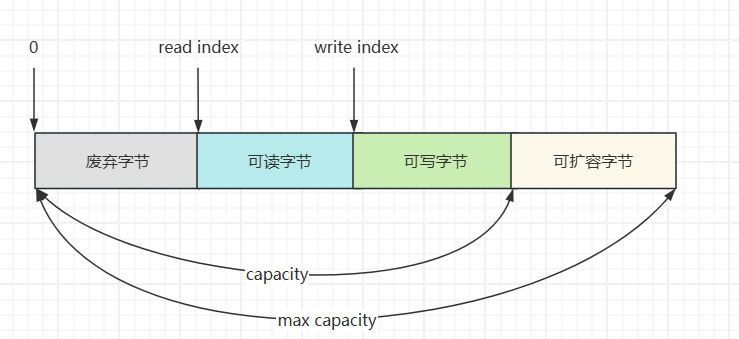
Netty - ByteBuf 3.4 ByteBuf(1)创建// 创建一个池化基于直接内存的 ByteBuf(指定初始容量为16) ByteBuf bf = ByteBufAllocator.DEFAULT.buffer(16);(2)直接内存、堆内存// 创建池化基于堆内存的 ByteBuf ByteBuf bf = ByteBufAllocator.DEFAULT.heapBuffer(16); // 创建池化基于直接内存的 ByteBuf ByteBuf bf = ByteBufAllocator.DEFAULT.directBuffer(16);堆内存:创建和销毁的成本很高,但读写性能好(少一次内存复制)直接内存:不在 jvm 管辖范围内,GC 压力小(3)池化、非池化池化:可以重用 ByteBuf,高并发场景下更节约内存,能较少内存溢出的可能非池化:每次使用时都得创建新的 ByteBuf 实例,且在堆内存、直接内存不同的场景下影响不同Netty 4.1 后非 Android 平台默认开启池化(4)组成(5)写入方法参数说明备注writeBoolean(boolean value)写入 boolean 值一字节 01 表示 true、00 表示 falsewriteByte(int value)写入 byte 值 writeShort(int value)写入 short 值 writeInt(int value)写入 int 值Big Endian,即 0x250,写入后 00 00 02 50(网络编程一般情况下默认使用大端写入)writeIntLE(int value)写入 int 值Little Endian,即 0x250,写入后 50 02 00 00writeLong(long value)写入 long 值 writeChar(int value)写入 char 值 writeFloat(float value)写入 float 值 writeDouble(double value)写入 double 值 writeBytes(ByteBuf src)写入 netty 的 ByteBuf writeBytes(byte[] src)写入 byte[] writeBytes(ByteBuffer src)写入 nio 的 ByteBuffer int writeCharSequence(CharSequence sequence, Charset charset)写入字符串 演示:package com.sw.netty._04; import io.netty.buffer.ByteBuf; import io.netty.buffer.ByteBufAllocator; import static io.netty.buffer.ByteBufUtil.appendPrettyHexDump; import static io.netty.util.internal.StringUtil.NEWLINE; public class ByteBufTest { public static void main(String[] args) { ByteBuf bf = ByteBufAllocator.DEFAULT.buffer(10); bf.writeBytes(new byte[]{1, 2, 3, 4}); log(bf); // read index:0 write index:4 capacity:10 // +-------------------------------------------------+ // | 0 1 2 3 4 5 6 7 8 9 a b c d e f | // +--------+-------------------------------------------------+----------------+ // |00000000| 01 02 03 04 |.... | // +--------+-------------------------------------------------+----------------+ // 写入整型 10(4字节) bf.writeInt(10); log(bf); // read index:0 write index:8 capacity:10 // +-------------------------------------------------+ // | 0 1 2 3 4 5 6 7 8 9 a b c d e f | // +--------+-------------------------------------------------+----------------+ // |00000000| 01 02 03 04 00 00 00 0a |........ | // +--------+-------------------------------------------------+----------------+ } private static void log(ByteBuf buffer) { int length = buffer.readableBytes(); int rows = length / 16 + (length % 15 == 0 ? 0 : 1) + 4; StringBuilder buf = new StringBuilder(rows * 80 * 2) .append("read index:").append(buffer.readerIndex()) .append(" write index:").append(buffer.writerIndex()) .append(" capacity:").append(buffer.capacity()) .append(NEWLINE); appendPrettyHexDump(buf, buffer); System.out.println(buf); } } (6)扩容写入过程中,当 ByteBuf 容量不够时会进行扩容:如何写入后数据大小未超过 512,则选择下一个 16 的整数倍进行扩容,如:写入后大小为 12 ,则扩容后 capacity 是 16如果写入后数据大小超过 512,则选择下一个 2^n 进行扩容,如:写入后大小为 513,则扩容后 capacity 是 2^10=1024(2^9=512 已经不够了)扩容不能超过 max capacity 最大容量package com.sw.netty._04; import io.netty.buffer.ByteBuf; import io.netty.buffer.ByteBufAllocator; import static io.netty.buffer.ByteBufUtil.appendPrettyHexDump; import static io.netty.util.internal.StringUtil.NEWLINE; public class ByteBufTest { public static void main(String[] args) { ByteBuf bf = ByteBufAllocator.DEFAULT.buffer(16); bf.writeBytes(new byte[]{1, 2, 3, 4}); log(bf); // read index:0 write index:4 capacity:10 // +-------------------------------------------------+ // | 0 1 2 3 4 5 6 7 8 9 a b c d e f | // +--------+-------------------------------------------------+----------------+ // |00000000| 01 02 03 04 |.... | // +--------+-------------------------------------------------+----------------+ // 写入整型 10(4字节) bf.writeInt(10); log(bf); // read index:0 write index:8 capacity:10 // +-------------------------------------------------+ // | 0 1 2 3 4 5 6 7 8 9 a b c d e f | // +--------+-------------------------------------------------+----------------+ // |00000000| 01 02 03 04 00 00 00 0a |........ | // +--------+-------------------------------------------------+----------------+ // 继续写入(触发扩容) bf.writeBytes(new byte[]{1, 2, 3, 4, 5, 6, 7, 8, 9}); log(bf); // read index:0 write index:17 capacity:64 // +-------------------------------------------------+ // | 0 1 2 3 4 5 6 7 8 9 a b c d e f | // +--------+-------------------------------------------------+----------------+ // |00000000| 01 02 03 04 00 00 00 0a 01 02 03 04 05 06 07 08 |................| // |00000010| 09 |. | // +--------+-------------------------------------------------+----------------+ } private static void log(ByteBuf buffer) { int length = buffer.readableBytes(); int rows = length / 16 + (length % 15 == 0 ? 0 : 1) + 4; StringBuilder buf = new StringBuilder(rows * 80 * 2) .append("read index:").append(buffer.readerIndex()) .append(" write index:").append(buffer.writerIndex()) .append(" capacity:").append(buffer.capacity()) .append(NEWLINE); appendPrettyHexDump(buf, buffer); System.out.println(buf); } } (7)读取// 读取一个字节 System.out.println(buffer.readByte()); // 重复读取 // 1. 做标记 buffer.markReaderIndex(); System.out.println(buffer.readInt()); // 2. 重置到标记位置 buffer.resetReaderIndex(); System.out.println(buffer.readInt());注:io 读取操作类似于水流出水管,ByteBuf 提供的 getXxx() 方法也可以重复读取,且不会改变 read index(8)retain、releaseNetty 中使用了引用计数法来控制回收内存,每个 ByteBuf 都实现了 ReferenceCounted 接口每个 ByteBuf 对象的初始计数为 1release 计数器减一retain 计数器加一,调用者调用了 retain 方法时,在未使用完之前,即使其他 handler 调用了 release 方法。内存也不会释放,因为引用计数器此时不为 0当引用计数器为 0 时,底层内存会被回收(即使 ByteBuf 对象还存在,释放之后便不能再正常使用)内存释放规则:谁最后一个使用,谁负责释放入站处理规则:原始 ByteBuf 不做处理,调用 ctx.fireChannelRead(msg) 向后续的 handler 传递,此时无须 releaseByteBuf 被转换为其他 Java 对象时,ByteBuf 对象必须 release 处理(在调用链中传递的是转换后的对象,或者说在这个 handler 中转换了,也使用完了,无需再向后传递)如果不需要再向后传递,必须 release传递失败时,需要在 flnally 中 release如果 msg 一直传递到了 tail,则由 tail 负责 release出站处理规则:出站 msg 最终会以 ByteBuf 的形式输出,会一直传递到 head,由 head 负责 release异常处理规则:ByteBuf 在 pipeline 中出现异常时,必须 release,即申请的资源需要关闭/归还/释放(8)slice 切片对原始 ByteBuf 进行切片操作,可以生成多个 ByteBuf,切片时不会发生内存复制,还是使用原 ByteBuf 的内存(零拷贝),但生成的 ByteBuf 各自独立维护读指针、写指针注:切片后的 ByteBuf 的 max capacity 固定为切片区间(read index, write index)的大小,且不能追加写入新的内容切片后的 ByteBuf 如果内容发生了变化,原始 ByteBuf 的内容也会随之变化(底层使用了同一块内存)package com.sw.netty._04; import io.netty.buffer.ByteBuf; import io.netty.buffer.ByteBufAllocator; import static utils.ByteBufferUtil.log; public class ByteBufSliceTest { public static void main(String[] args) { ByteBuf bf = ByteBufAllocator.DEFAULT.buffer(16); bf.writeBytes(new byte[]{'0', '1', '2', '3', '4', '5', '6', '7', '8', '9', 'a', 'b', 'd', 'c', 'd', 'e', 'f'}); log(bf); // read index:0 write index:17 capacity:64 // +-------------------------------------------------+ // | 0 1 2 3 4 5 6 7 8 9 a b c d e f | // +--------+-------------------------------------------------+----------------+ // |00000000| 30 31 32 33 34 35 36 37 38 39 61 62 64 63 64 65 |0123456789abdcde| // |00000010| 66 |f | // +--------+-------------------------------------------------+----------------+ // 切片(切片过程中不会发生数据的复制) ByteBuf bf1 = bf.slice(0, 5); log(bf1); // read index:0 write index:5 capacity:5 // +-------------------------------------------------+ // | 0 1 2 3 4 5 6 7 8 9 a b c d e f | // +--------+-------------------------------------------------+----------------+ // |00000000| 30 31 32 33 34 |01234 | // +--------+-------------------------------------------------+----------------+ bf1.retain(); ByteBuf bf2 = bf.slice(5, 5); log(bf2); // read index:0 write index:5 capacity:5 // +-------------------------------------------------+ // | 0 1 2 3 4 5 6 7 8 9 a b c d e f | // +--------+-------------------------------------------------+----------------+ // |00000000| 35 36 37 38 39 |56789 | // +--------+-------------------------------------------------+----------------+ // 释放内存 bf.release(); System.out.println("ByteBuf 内存已释放"); // 如果后续还要使用,需要显式 retain,防止计数器为0,内存被释放 log(bf); } } (10)duplicate截取原始 ByteBuf 的所有内容(零拷贝),没有 max capacity 限制,且独立维护读写指针(11)CompositeByteBuf将多个 ByteBuf 合并为一个逻辑上的 ByteBuf(零拷贝),该方法在内部维护了一个 Component 数组,每个 Component 维护一个 ByteBuf,代表整体中的某一段数据package com.sw.netty._04; import io.netty.buffer.ByteBuf; import io.netty.buffer.ByteBufAllocator; import io.netty.buffer.CompositeByteBuf; import static utils.ByteBufferUtil.log; public class ByteBufCompositeTest { public static void main(String[] args) { ByteBuf bf = ByteBufAllocator.DEFAULT.buffer(); bf.writeBytes(new byte[]{'0', '1', '2', '3', '4', '5'}); ByteBuf bf1 = ByteBufAllocator.DEFAULT.buffer(); bf1.writeBytes(new byte[]{'6', '7', '8', '9', 'a'}); // 合并 ByteBuf // 方式一:(业务场景复杂,数据量大时,会产生很多io操作,不推荐) // ByteBuf bf2 = ByteBufAllocator.DEFAULT.buffer(); // bf2.writeBytes(bf).writeBytes(bf1); // log(bf2); // 方式二:(可以避免频繁的数据拷贝操作) CompositeByteBuf bf2 = ByteBufAllocator.DEFAULT.compositeBuffer(); // 通过 increaseWriteIndex 参数调整写入指针,不然合并不进去 bf2.addComponents(true, bf, bf1); log(bf2); // read index:0 write index:11 capacity:11 // +-------------------------------------------------+ // | 0 1 2 3 4 5 6 7 8 9 a b c d e f | // +--------+-------------------------------------------------+----------------+ // |00000000| 30 31 32 33 34 35 36 37 38 39 61 |0123456789a | // +--------+-------------------------------------------------+----------------+ } } (13)UnpooledUnpooled 是一个工具类,提供非池化 ByteBuf 的创建、组合、复制(零拷贝)等操作package com.sw.netty._04; import io.netty.buffer.ByteBuf; import io.netty.buffer.ByteBufAllocator; import io.netty.buffer.Unpooled; import static utils.ByteBufferUtil.log; public class ByteBufUnpooledTest { public static void main(String[] args) { ByteBuf bf = ByteBufAllocator.DEFAULT.buffer(4); bf.writeBytes(new byte[]{1, 2, 3, 4}); ByteBuf bf1 = ByteBufAllocator.DEFAULT.buffer(4); bf.writeBytes(new byte[]{5, 6, 7, 8}); // 当包装多个 ByteBuf 时,底层使用 CompositeByteBuf ByteBuf bf2 = Unpooled.wrappedBuffer(bf, bf1); System.out.println(bf2.getClass()); // class io.netty.buffer.CompositeByteBuf log(bf2); // read index:0 write index:8 capacity:8 // +-------------------------------------------------+ // | 0 1 2 3 4 5 6 7 8 9 a b c d e f | // +--------+-------------------------------------------------+----------------+ // |00000000| 01 02 03 04 05 06 07 08 |........ | // +--------+-------------------------------------------------+----------------+ // 普通 byte 数组同理 ByteBuf bf3 = Unpooled.wrappedBuffer(new byte[]{'a', 'b'}, new byte[]{'c', 'd'}); System.out.println(bf3.getClass()); // class io.netty.buffer.CompositeByteBuf log(bf3); // read index:0 write index:4 capacity:4 // +-------------------------------------------------+ // | 0 1 2 3 4 5 6 7 8 9 a b c d e f | // +--------+-------------------------------------------------+----------------+ // |00000000| 61 62 63 64 |abcd | // +--------+-------------------------------------------------+----------------+ } } (14)ByteBuf 优势池化可重用,节约内存,在一定程度上减少内存溢出的可能读写指针分离,不需要像 ByteBuffer 一样显式切换读写模式自动扩容支持链式调用slice、duplicate、CompositeByteBuf 等使用零拷贝,减少内存的复制
-
Netty - Channel & Pipeline 3.3 Handler & Pipeline(1)HandlerChannelHandler 用于处理 Channel 上的各种事件,分为入站、出战两种,不同的 ChannelHandler 被连成一串,就形成了 PipelineChannel 可以看作产品的加工车间,Pipeline 是加工流水线,ChannelHandler 是流水线上的各道工艺,ByteBuffer 是原材料入站处理器package com.sw.netty._03; import io.netty.bootstrap.ServerBootstrap; import io.netty.buffer.ByteBuf; import io.netty.channel.*; import io.netty.channel.nio.NioEventLoopGroup; import io.netty.channel.socket.nio.NioServerSocketChannel; import io.netty.channel.socket.nio.NioSocketChannel; import lombok.extern.slf4j.Slf4j; import java.nio.charset.Charset; @Slf4j public class PipelineTest { public static void main(String[] args) { new ServerBootstrap() .group(new NioEventLoopGroup()) .channel(NioServerSocketChannel.class) .childHandler(new ChannelInitializer<NioSocketChannel>() { @Override protected void initChannel(NioSocketChannel ch) throws Exception { // 1. pipeline ChannelPipeline pipeline = ch.pipeline(); // 2. 添加 handler 处理器 pipeline.addLast("handler - 1", new ChannelInboundHandlerAdapter() { @Override public void channelRead(ChannelHandlerContext ctx, Object msg) throws Exception { ByteBuf bf = (ByteBuf) msg; String data = bf.toString(Charset.defaultCharset()); log.info("handler-1 收到客户端发送的数据:{}", data); // 必须显式传递给下一个 handler, channelRead 和 fireChannelRead 方法任选其一 // super.channelRead(ctx, ch); ctx.fireChannelRead(data); } }); pipeline.addLast("handler - 2", new ChannelInboundHandlerAdapter() { @Override public void channelRead(ChannelHandlerContext ctx, Object msg) throws Exception { log.info("handler-2 收到上一个处理器处理之后的数据:{}", msg); super.channelRead(ctx, msg); } }); pipeline.addLast("handler - 3", new ChannelInboundHandlerAdapter() { @Override public void channelRead(ChannelHandlerContext ctx, Object msg) throws Exception { log.info("handler-3 收到上一个处理器处理之后的数据:{}", msg); super.channelRead(ctx, msg); ch.writeAndFlush(ctx.alloc().buffer().writeBytes("sunxiaochuan".getBytes())); } }); pipeline.addLast("handler - 4", new ChannelOutboundHandlerAdapter() { @Override public void write(ChannelHandlerContext ctx, Object msg, ChannelPromise promise) throws Exception { log.info("4 处理数据..."); super.write(ctx, msg, promise); } }); pipeline.addLast("handler - 5", new ChannelOutboundHandlerAdapter() { @Override public void write(ChannelHandlerContext ctx, Object msg, ChannelPromise promise) throws Exception { log.info("5 处理数据..."); super.write(ctx, msg, promise); } }); } }) .bind(8088); } } 出站处理器package com.sw.netty._03; import io.netty.bootstrap.ServerBootstrap; import io.netty.buffer.ByteBuf; import io.netty.channel.*; import io.netty.channel.nio.NioEventLoopGroup; import io.netty.channel.socket.nio.NioServerSocketChannel; import io.netty.channel.socket.nio.NioSocketChannel; import lombok.extern.slf4j.Slf4j; import java.nio.charset.Charset; @Slf4j public class PipelineTest { public static void main(String[] args) { new ServerBootstrap() .group(new NioEventLoopGroup()) .channel(NioServerSocketChannel.class) .childHandler(new ChannelInitializer<NioSocketChannel>() { @Override protected void initChannel(NioSocketChannel ch) throws Exception { // 1. pipeline ChannelPipeline pipeline = ch.pipeline(); // 2. 添加 handler 处理器 pipeline.addLast("handler - 1", new ChannelInboundHandlerAdapter() { @Override public void channelRead(ChannelHandlerContext ctx, Object msg) throws Exception { ByteBuf bf = (ByteBuf) msg; String data = bf.toString(Charset.defaultCharset()); log.info("handler-1 收到客户端发送的数据:{}", data); // 必须显式传递给下一个 handler, channelRead 和 fireChannelRead 方法任选其一 // super.channelRead(ctx, ch); ctx.fireChannelRead(data); } }); pipeline.addLast("handler - 2", new ChannelInboundHandlerAdapter() { @Override public void channelRead(ChannelHandlerContext ctx, Object msg) throws Exception { log.info("handler-2 收到上一个处理器处理之后的数据:{}", msg); super.channelRead(ctx, msg); } }); pipeline.addLast("handler - 3", new ChannelInboundHandlerAdapter() { @Override public void channelRead(ChannelHandlerContext ctx, Object msg) throws Exception { log.info("handler-3 收到上一个处理器处理之后的数据:{}", msg); super.channelRead(ctx, msg); // channel.write() 方法的流水线顺序: head -> handler-1 -> handler-2 -> handler-3 -> handler-5 -> handler-4 -> tail // 入站处理器查找完后先到 tail,再从 tail 处从后往前查找出战处理器 ch.writeAndFlush(ctx.alloc().buffer().writeBytes("sunxiaochuan".getBytes())); // ctx.write() 方法的流水线顺序: head -> handler-1 -> handler-2 -> handler-3 -> tail // 从调用 ctx.write() 方法的 handler 处从后往前查找 ctx.writeAndFlush(ctx.alloc().buffer().writeBytes("sunxiaochuan".getBytes())); } }); pipeline.addLast("handler - 4", new ChannelOutboundHandlerAdapter() { @Override public void write(ChannelHandlerContext ctx, Object msg, ChannelPromise promise) throws Exception { log.info("4 处理数据..."); super.write(ctx, msg, promise); } }); pipeline.addLast("handler - 5", new ChannelOutboundHandlerAdapter() { @Override public void write(ChannelHandlerContext ctx, Object msg, ChannelPromise promise) throws Exception { log.info("5 处理数据..."); super.write(ctx, msg, promise); } }); } }) .bind(8088); } }
-
Netty - Channel 3.2 Channel(1)sync 同步处理、addListener 异步处理package com.sw.netty._02_EventLoop; import io.netty.bootstrap.Bootstrap; import io.netty.channel.Channel; import io.netty.channel.ChannelFuture; import io.netty.channel.ChannelFutureListener; import io.netty.channel.ChannelInitializer; import io.netty.channel.nio.NioEventLoopGroup; import io.netty.channel.socket.nio.NioSocketChannel; import io.netty.handler.codec.string.StringEncoder; import lombok.extern.slf4j.Slf4j; import java.net.InetSocketAddress; @Slf4j public class ChannelClient { public static void main(String[] args) throws InterruptedException { ChannelFuture channelFuture = new Bootstrap() .group(new NioEventLoopGroup()) .channel(NioSocketChannel.class) .handler(new ChannelInitializer<NioSocketChannel>() { @Override protected void initChannel(NioSocketChannel ch) throws Exception { ch.pipeline().addLast(new StringEncoder()); } }) // 1. 连接到服务端 // connect 异步阻塞,main 线程创建 channelFuture,而后真正去执行 connect 的是 nio 线程 .connect(new InetSocketAddress("localhost", 8088)); // 2.1 使用 sync 方法同步处理结果 // 调用 sync 时,线程阻塞直到 nio 线程与服务端连接建立完毕 // channelFuture.sync(); // Channel channel = channelFuture.channel(); // log.info("sync {}", channel); // channel.writeAndFlush("sync test"); // 2.2 使用 addListener 异步处理结果 channelFuture.addListener(new ChannelFutureListener() { @Override public void operationComplete(ChannelFuture future) throws Exception { // 在 nio 线程与服务端建立好连接后,调用 operationComplete 执行后面的操作 Channel channel = channelFuture.channel(); log.info("async {}", channel); channel.writeAndFlush("async test"); } }); } } (2)closeFuturepackage com.sw.netty._02_EventLoop; import io.netty.bootstrap.Bootstrap; import io.netty.channel.Channel; import io.netty.channel.ChannelFuture; import io.netty.channel.ChannelFutureListener; import io.netty.channel.ChannelInitializer; import io.netty.channel.nio.NioEventLoopGroup; import io.netty.channel.socket.nio.NioSocketChannel; import io.netty.handler.codec.string.StringEncoder; import lombok.extern.slf4j.Slf4j; import java.net.InetSocketAddress; import java.util.Scanner; @Slf4j public class CloseFutureClient { public static void main(String[] args) throws InterruptedException { NioEventLoopGroup eventLoopGroup = new NioEventLoopGroup(); ChannelFuture channelFuture = new Bootstrap() .group(eventLoopGroup) .channel(NioSocketChannel.class) .handler(new ChannelInitializer<NioSocketChannel>() { @Override protected void initChannel(NioSocketChannel ch) throws Exception { ch.pipeline().addLast(new StringEncoder()); } }) .connect(new InetSocketAddress("localhost", 8088)); Channel channel = channelFuture.channel(); new Thread(() -> { Scanner scanner = new Scanner(System.in); while (true) { String input = scanner.nextLine(); if ("q".equals(input)) { channel.close(); break; } channel.writeAndFlush(input); } }, "input client").start(); ChannelFuture closeFuture = channel.closeFuture(); log.info("closing..."); // 1. 同步处理关闭 // closeFuture.sync(); // log.info("channel closed"); // 23:45:06.789 [main] INFO com.sw.netty._02_EventLoop.CloseFutureClient - channel closed // eventLoopGroup.shutdownGracefully(); // 23:46:08.678 [nioEventLoopGroup-2-1] DEBUG io.netty.buffer.PoolThreadCache - Freed 1 thread-local buffer(s) from thread: nioEventLoopGroup-2-1 // 2. 异步关闭 closeFuture.addListener((ChannelFutureListener) future -> { log.info("channel closed"); // 23:48:20.725 [nioEventLoopGroup-2-1] INFO com.sw.netty._02_EventLoop.CloseFutureClient - channel closed eventLoopGroup.shutdownGracefully(); // 23:49:24.541 [nioEventLoopGroup-2-1] DEBUG io.netty.buffer.PoolThreadCache - Freed 1 thread-local buffer(s) from thread: nioEventLoopGroup-2-1 }); } }
-
Netty - 组件 - EventLoop 3. 组件3.1 EventLoop(1)概念EventLoop 事件循环对象本质是一个单线程处理器(同时维护了一个 Selector),它继承的父类分为:ScheduledExecutorService,定时任务线程池netty - OrderedEventExecutor,可以判断线程是否属于当前的 EventLoop,和查找线程属于哪个 EventLoopEventLoopGroup 是 EventLoop 事件循环对象的一组集合,Channel 会通过 register 方法来注册绑定其中的一个 EventLoop,后续该 Channel 中的事件都由绑定的 EventLoop 来处理,它的功能包含:遍历组中的事件循环对象获取下一个事件循环对象(实现了 Iterable 接口)(2)EventLoop 任务处理 Demopackage com.sw.netty._02_EventLoop; import io.netty.channel.nio.NioEventLoopGroup; import lombok.extern.slf4j.Slf4j; import java.util.concurrent.TimeUnit; @Slf4j public class EventLoopTest { public static void main(String[] args) { // 1. 创建事件循环组 NioEventLoopGroup eventExecutors = new NioEventLoopGroup(); // 2. 执行普通任务 // eventExecutors.next().execute(() -> log.info("execute normal task")); // 3. 定时任务 eventExecutors.next().scheduleAtFixedRate(() -> log.info("execute schedule task"), 1L, 2L, TimeUnit.SECONDS); log.info("main"); } } (3)EventLoop 处理 io 事件 DemoServerpackage com.sw.netty._02_EventLoop; import io.netty.bootstrap.ServerBootstrap; import io.netty.buffer.ByteBuf; import io.netty.channel.ChannelHandlerContext; import io.netty.channel.ChannelInboundHandlerAdapter; import io.netty.channel.ChannelInitializer; import io.netty.channel.DefaultEventLoopGroup; import io.netty.channel.nio.NioEventLoopGroup; import io.netty.channel.socket.nio.NioServerSocketChannel; import io.netty.channel.socket.nio.NioSocketChannel; import lombok.extern.slf4j.Slf4j; import java.nio.charset.Charset; @Slf4j public class Server { public static void main(String[] args) { DefaultEventLoopGroup defaultGroup = new DefaultEventLoopGroup(); new ServerBootstrap() // accept eventLoop, read eventLoop .group(new NioEventLoopGroup(), new NioEventLoopGroup()) .channel(NioServerSocketChannel.class) .childHandler(new ChannelInitializer<NioSocketChannel>() { @Override protected void initChannel(NioSocketChannel ch) throws Exception { ch.pipeline().addLast("handler-01", new ChannelInboundHandlerAdapter() { @Override public void channelRead(ChannelHandlerContext ctx, Object msg) throws Exception { log.info("处理时间较长的请求"); ByteBuf bf = (ByteBuf) msg; log.info(bf.toString(Charset.defaultCharset())); // 将消息传递给下一个 handler ctx.fireChannelRead(msg); } }) .addLast(defaultGroup, "handler-02", new ChannelInboundHandlerAdapter() { @Override public void channelRead(ChannelHandlerContext ctx, Object msg) throws Exception { log.info("处理时间正常的请求"); ByteBuf bf = (ByteBuf) msg; log.info(bf.toString(Charset.defaultCharset())); } }); } }) .bind(8088); } } Clientpackage com.sw.netty._02_EventLoop; import io.netty.bootstrap.Bootstrap; import io.netty.channel.Channel; import io.netty.channel.ChannelInitializer; import io.netty.channel.nio.NioEventLoopGroup; import io.netty.channel.socket.nio.NioSocketChannel; import io.netty.handler.codec.string.StringEncoder; import java.net.InetSocketAddress; public class Client { public static void main(String[] args) throws InterruptedException { // 1.启动器 Channel channel = new Bootstrap() // 2. EventLoop .group(new NioEventLoopGroup()) // 3. channel 实现 .channel(NioSocketChannel.class) // 4. 添加 handler .handler(new ChannelInitializer<NioSocketChannel>() { @Override protected void initChannel(NioSocketChannel ch) throws Exception { // 在连接建立之后被调用 ch.pipeline().addLast(new StringEncoder()); } }) .connect(new InetSocketAddress("localhost", 8088)) .sync() .channel(); System.out.println("test"); } }
-
Netty - 概念、快速开始 1. 概念Netty 是一个异步,基于事件驱动的网络应用框架2. 快速开始pom 依赖<dependency> <groupId>io.netty</groupId> <artifactId>netty-all</artifactId> <version>4.1.39.Final</version> </dependency>2.1 Serverpackage com.sw.netty._01; import io.netty.bootstrap.ServerBootstrap; import io.netty.channel.ChannelHandlerContext; import io.netty.channel.ChannelInboundHandlerAdapter; import io.netty.channel.ChannelInitializer; import io.netty.channel.nio.NioEventLoopGroup; import io.netty.channel.socket.nio.NioServerSocketChannel; import io.netty.channel.socket.nio.NioSocketChannel; import io.netty.handler.codec.string.StringDecoder; public class Server { public static void main(String[] args) { // 1. 启动器,负责组装 netty 组件 new ServerBootstrap() // 2. 事件组 .group(new NioEventLoopGroup()) // 3. channel 实现 .channel(NioServerSocketChannel.class) // 4. 声明不同的 worker 负责的工作(处理哪些事件) .childHandler(// 5. 与客户端进行数据读写的通道(初始化工作) new ChannelInitializer<NioSocketChannel>() { @Override protected void initChannel(NioSocketChannel ch) throws Exception { // 6. 添加具体 handler ch.pipeline().addLast(new StringDecoder()); ch.pipeline().addLast(new ChannelInboundHandlerAdapter() { @Override public void channelRead(ChannelHandlerContext ctx, Object msg) throws Exception { System.out.println(msg); } }); } }) // 7. 监听端口 .bind(8088); } } 注:注释 6,在 pipeline 中,下一个 handler 会使用上一个 handler 的处理结果2.2 Clientpackage com.sw.netty._01; import io.netty.bootstrap.Bootstrap; import io.netty.channel.ChannelInitializer; import io.netty.channel.nio.NioEventLoopGroup; import io.netty.channel.socket.nio.NioSocketChannel; import io.netty.handler.codec.string.StringEncoder; import java.net.InetSocketAddress; public class Client { public static void main(String[] args) throws InterruptedException { // 1.启动器 new Bootstrap() // 2. EventLoop .group(new NioEventLoopGroup()) // 3. channel 实现 .channel(NioSocketChannel.class) // 4. 添加 handler .handler(new ChannelInitializer<NioSocketChannel>() { @Override protected void initChannel(NioSocketChannel ch) throws Exception { // 在连接建立之后被调用 ch.pipeline().addLast(new StringEncoder()); } }) .connect(new InetSocketAddress("localhost", 8088)) // 显式声明使用同步方法,等待 server 端连接建立完毕 .sync() .channel() .writeAndFlush("sunxiaochuan"); } } 2.3 补充(1)channel 可以看作是处理数据的通道(2)输入 ByteBuffer,经 pipeline 后会处理为具体类型的对象,最终又输出 ByteBuffer(3)handler 处理数据,pipeline 负责分发具体的事件(读、写)给 handler,分为 Inbound 和 Outbound(4)eventLoop 可以看作数据处理者,并且与 channel 的生命周期绑定,每位处理者有对应的任务队列(普通任务、定时任务),根据 pipeline 流水线的顺序进行处理
-
NIO基础 - 多线程优化 5. 多线程优化5.1 以分组选择器为例:专门用一个线程配合 Selector,只负责 Accept 事件(boss)其他线程配合各自对应的 Selector,只负责 Read、Write 事件(worker)Serverpackage com.sw.netty._05; import lombok.extern.slf4j.Slf4j; import java.io.IOException; import java.net.InetSocketAddress; import java.nio.ByteBuffer; import java.nio.channels.*; import java.util.Iterator; import java.util.concurrent.ConcurrentLinkedDeque; import static utils.ByteBufferUtil.debugAll; @Slf4j public class MultiThreadServer { public static void main(String[] args) throws IOException { Thread.currentThread().setName("boss"); ServerSocketChannel ssc = ServerSocketChannel.open(); ssc.configureBlocking(false); Selector selector = Selector.open(); SelectionKey sscKey = ssc.register(selector, 0, null); sscKey.interestOps(SelectionKey.OP_ACCEPT); ssc.bind(new InetSocketAddress(8088)); // 1. 创建 worker Worker worker = new Worker("worker-0"); while (true) { selector.select(); Iterator<SelectionKey> iterator = selector.selectedKeys().iterator(); while (iterator.hasNext()) { SelectionKey key = iterator.next(); iterator.remove(); if (key.isAcceptable()) { SocketChannel sc = ssc.accept(); sc.configureBlocking(false); log.info("connected - [{}]", sc.getLocalAddress()); // 2. 关联读写事件的 selector log.info("before register - [{}]", sc.getLocalAddress()); worker.register(sc); log.info("after register - [{}]", sc.getLocalAddress()); } } } } static class Worker implements Runnable { private Thread thread; private Selector selector; private String name; private volatile boolean start = false; private ConcurrentLinkedDeque<Runnable> queue = new ConcurrentLinkedDeque<>(); public Worker(String name) { this.name = name; } // 初始化线程、Selector public void register(SocketChannel sc) throws IOException { if (!start) { selector = Selector.open(); thread = new Thread(this, name); thread.start(); start = true; } queue.add(() -> { try { sc.register(selector, SelectionKey.OP_READ); } catch (ClosedChannelException e) { throw new RuntimeException(e); } }); // 显式唤醒 worker 的 selector.select() 阻塞,注册后续的读写事件 selector.wakeup(); } @Override public void run() { while (true) { try { selector.select(); // 阻塞 Runnable task = queue.poll(); if (task != null) { task.run(); } Iterator<SelectionKey> iterator = selector.selectedKeys().iterator(); while (iterator.hasNext()) { SelectionKey key = iterator.next(); iterator.remove(); if (key.isReadable()) { ByteBuffer bf = ByteBuffer.allocate(16); SocketChannel channel = (SocketChannel) key.channel(); log.info("read client data - [{}]", channel.getLocalAddress()); channel.read(bf); bf.flip(); debugAll(bf); } } } catch (IOException e) { throw new RuntimeException(e); } } } } } Clientpackage com.sw.netty._05; import java.io.IOException; import java.net.InetSocketAddress; import java.nio.channels.SocketChannel; import java.nio.charset.Charset; public class Client { public static void main(String[] args) throws IOException { SocketChannel sc = SocketChannel.open(); sc.connect(new InetSocketAddress("localhost", 8088)); sc.write(Charset.defaultCharset().encode("0123456789abcdefsunxiaochuan")); System.in.read(); } } 5.2 selector.wakeup() 补充selector.wakeup() 方法与 selector.select() 书写的前后顺序不影响运行时的阻塞唤醒, 如:wakeup 在前,select 在后,wakeup 执行时先颁发凭证,select 执行时检测到有之前颁发的凭证,此时不会阻塞,而是继续向下运行5.3 多 workerServerpackage com.sw.netty._05; import lombok.extern.slf4j.Slf4j; import java.io.IOException; import java.net.InetSocketAddress; import java.nio.ByteBuffer; import java.nio.channels.*; import java.util.Iterator; import java.util.concurrent.ConcurrentLinkedDeque; import java.util.concurrent.atomic.AtomicInteger; import static utils.ByteBufferUtil.debugAll; @Slf4j public class MultiThreadServer { public static void main(String[] args) throws IOException { Thread.currentThread().setName("boss"); ServerSocketChannel ssc = ServerSocketChannel.open(); ssc.configureBlocking(false); Selector selector = Selector.open(); SelectionKey sscKey = ssc.register(selector, 0, null); sscKey.interestOps(SelectionKey.OP_ACCEPT); ssc.bind(new InetSocketAddress(8088)); // 1. 创建 worker Worker[] workers = new Worker[Runtime.getRuntime().availableProcessors()]; for (int i = 0; i < workers.length; i++) { workers[i] = new Worker("worker-" + i); } AtomicInteger index = new AtomicInteger(); while (true) { selector.select(); Iterator<SelectionKey> iterator = selector.selectedKeys().iterator(); while (iterator.hasNext()) { SelectionKey key = iterator.next(); iterator.remove(); if (key.isAcceptable()) { SocketChannel sc = ssc.accept(); sc.configureBlocking(false); log.info("connected - [{}]", sc.getLocalAddress()); // 2. 关联读写事件的 selector log.info("before register - [{}]", sc.getLocalAddress()); // 轮询 workers[index.getAndIncrement() % workers.length].register(sc); log.info("after register - [{}]", sc.getLocalAddress()); } } } } static class Worker implements Runnable { private Thread thread; private Selector selector; private String name; private volatile boolean start = false; private ConcurrentLinkedDeque<Runnable> queue = new ConcurrentLinkedDeque<>(); public Worker(String name) { this.name = name; } // 初始化线程、Selector public void register(SocketChannel sc) throws IOException { if (!start) { selector = Selector.open(); thread = new Thread(this, name); thread.start(); start = true; } queue.add(() -> { try { sc.register(selector, SelectionKey.OP_READ); } catch (ClosedChannelException e) { throw new RuntimeException(e); } }); // 显式唤醒 worker 的 selector.select() 阻塞,注册后续的读写事件 selector.wakeup(); } @Override public void run() { while (true) { try { selector.select(); // 阻塞 Runnable task = queue.poll(); if (task != null) { task.run(); } Iterator<SelectionKey> iterator = selector.selectedKeys().iterator(); while (iterator.hasNext()) { SelectionKey key = iterator.next(); iterator.remove(); if (key.isReadable()) { ByteBuffer bf = ByteBuffer.allocate(16); SocketChannel channel = (SocketChannel) key.channel(); log.info("read client data - [{}]", channel.getLocalAddress()); channel.read(bf); bf.flip(); debugAll(bf); } } } catch (IOException e) { throw new RuntimeException(e); } } } } }