


1. 概念
Redux 是 React 最常用的集中式状态管理工具,与 Vue 中的 Vuex、Pina 类似,可以独立于框架运行
2. 快速上手
计数器 demo
- 定义 reducer 函数
- 使用 createStore 方法传入 reducer 函数,生成 store 实例对象
- 使用 store 实例的 subscribe 方法订阅数据的变化
- 使用 store 实例的 dispatch 方法提交 action 对象,以此触发数据的变化(告诉 reducer 对数据的修改)
- 使用 store 实例的 getState 方法获取最新的状态数据,更新视图
<!doctype html>
<html lang="en">
  <head>
    <meta charset="UTF-8" />
    <title>Redux Quick Start Demo</title>
  </head>
  <body>
    <button id="decrBtn">-</button>
    <span id="countSpan">0</span>
    <button id="incrBtn">+</button>
  </body>
  <script type="module">
    import { legacy_createStore as createStore } from 'https://unpkg.com/redux@5.0.1/dist/redux.browser.mjs'

    // 1. 定义 reducer 函数
    function reducer(state = { count: 0 }, action) {
      if (action.type === 'INCREMENT') {
        return { count: state.count + 1 }
      }

      if (action.type === 'DECREMENT') {
        return { count: state.count - 1 }
      }
      return state
    }

    // 2. 创建 store 实例对象
    const store = createStore(reducer)

    // 3. 订阅数据变化
    store.subscribe(() => {
      console.log('count update', store.getState())

      // 5. 获取最新数据,更新状态
      document.getElementById('countBtn').innerText = store.getState()
    })

    // 4. 通过 dispatch 提交 action 更改状态
    const decrBtn = document.getElementById('decrBtn')
    decrBtn.addEventListener('click', () => {
      store.dispatch({ type: 'DECREMENT' })
    })

    const incrBtn = document.getElementById('incrBtn')
    incrBtn.addEventListener('click', () => {
      store.dispatch({ type: 'INCREMENT' })
    })
  </script>
</html>
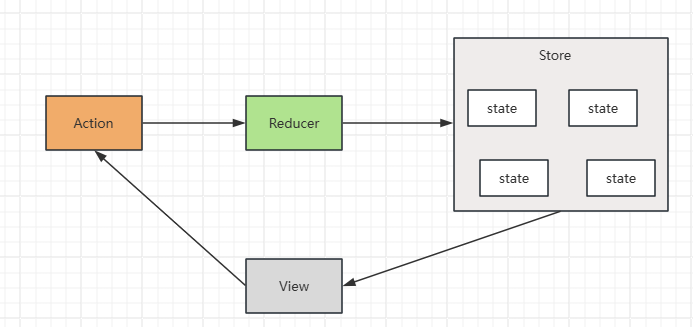
管理数据的流程:
- state:存放管理的数据状态
- action:描述怎么修改数据
- reducer:(函数)根据 action 的表述生成一个新的 state
3. 在 React 中使用 Redux
(1)Redux Toolkit(RTK)
RTK 是官方推荐的编写 Redux 逻辑的方式之一,是一套工具的集合,其作用如下:
- 简化 store 配置
- 内置 immer,支持可变式状态修改
- 内置 thunk,便于异步的创建和使用
(2)react-redux
连接 Redux 和 React 组件的中间件
(3)redux-demo
包含:cli 脚手架 redux 计数器案例、提交 action 传参、异步状态操作
https://github.com/suaxi/develop-relevant-notes/tree/main/front-end/React18/code/redux-demo



评论 (0)