


在安装 istio 的时候,同时安装了入口和出口网关,这两个网关都运行了一个 Envoy 代理实例,它们在网格的边缘作为负载均衡器的角色。
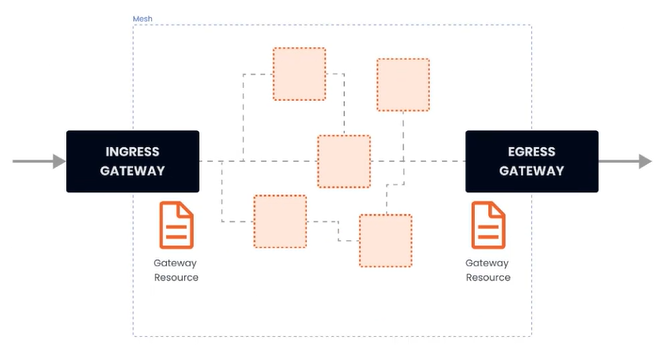
gateway 资源实例:
apiVersion: networking.istio.io/v1alpha3
  kind: Gateway
  metadata:
    name: gateway-demo
    namespace: default
  spec:
    selector:
      istio: ingressgateway
    servers:
    - port:
        number: 80
        name: http
        protocol: HTTP
      hosts:
      - dev.example.com
      - test.example.com
上述示例做了哪些事:
- 配置了一个代理,作为负载均衡器
- 服务端口为80
- 应用于 istio 入口网关代理
- hosts 字段作为过滤器,只有以 dev.example.com 和 test.example.com 为目的地的流量才允许通过
为了控制和转发流量到集群内运行的实际实例,还需要配置 VirtualService,并与网关相连接。
(1)简单路由实例
部署 nginx,并通过 istio 网关进行访问
---
apiVersion: apps/v1
kind: Deployment
metadata:
  namespace: test
  name: nginx
  labels:
    app: nginx
spec:
  replicas: 1
  selector:
    matchLabels:
      app: nginx
  template:
    metadata:
      labels:
        app: nginx
    spec:
      restartPolicy: Always
      containers:
        - image: 'nginx:latest'
          imagePullPolicy: IfNotPresent
          name: nginx
          env:
            - name: TZ
              value: Asia/Shanghai
          ports:
            - containerPort: 80
              protocol: TCP

---
apiVersion: v1
kind: Service
metadata:
  namespace: test
  name: nginx
  labels:
    app: nginx
spec:
  ports:
    - port: 80
      targetPort: 80
      protocol: TCP
  selector:
    app: nginx
# 网关
apiVersion: networking.istio.io/v1alpha3
kind: Gateway
metadata:
name: gateway-nginx
namespace: test
spec:
selector:
istio: ingressgateway
servers:
- port:
number: 80
name: http
protocol: HTTP
hosts:
- '*'在未绑定 VirtualService 之前,网关还不知道要将流量路由到哪
apiVersion: networking.istio.io/v1alpha3
kind: VirtualService
metadata:
  name: virtualService-nginx
  namespace: test
spec:
  hosts:
    - '*'
  gateways:
    - gateway-nginx
  http:
    - route:
      - destination:
          host: nginx.test.svc.cluster.local
          port: 80
部署完之后,通过 curl -v x.x.x.x 即可测试



评论 (0)